
For enterprise B2B companies managing product pages, case study libraries, resource hubs, and service landing pages across thousands of URLs, how fast a website loads determines whether a senior decision-maker stays or leaves.
According to Google’s developer research on page speed and conversions, as page load time increases from one second to three seconds, the probability of a mobile visitor bouncing increases by 32%.
For procurement managers and IT buyers comparing vendors across multiple browser tabs, a slow-loading site signals technical incompetence before your value proposition is ever seen. Investing in professional B2B site speed optimization services is the most direct way to eliminate that failure and ensure every qualified visitor reaches your content intact.
Consequently, poor site performance is one of the most common reasons B2B companies stall in organic growth despite strong content output and active link-building programmes. Search engines will not rank pages they cannot crawl, render, and evaluate efficiently. Understanding why modern enterprise B2B brands prioritize B2B site speed optimization services is the first step toward unlocking the full SEO and AI search potential of your website.
Consequently, poor site performance is one of the most common reasons B2B companies stall in organic growth despite strong content output and active link-building programmes. Search engines will not rank pages they cannot crawl, render, and evaluate efficiently. Understanding why modern enterprise B2B brands prioritize B2B site speed optimization services is the first step toward unlocking the full SEO and AI search potential of your website.
What Are B2B Site Speed Optimization Services?
Direct Answer: B2B site speed optimization services are technical performance programmes that reduce page load times, improve Core Web Vitals scores, and fix server-level bottlenecks for enterprise B2B websites with complex CMS architectures, third-party script dependencies, and global buyer audiences.
According to Google’s official Core Web Vitals documentation, the three Core Web Vitals metrics are confirmed page experience ranking signals used directly in Google Search ranking. Those three metrics are Largest Contentful Paint (LCP), Interaction to Next Paint (INP), and Cumulative Layout Shift (CLS). All three are directly shaped by the work performed within a professional B2B site speed optimization programme.
B2B websites face performance challenges that consumer e-commerce sites typically do not encounter:
- Heavier page weight from enterprise CMS platforms such as HubSpot, Salesforce, and Marketo-integrated sites carrying heavy tracking script stacks
- Multiple third-party dependencies including CRM integrations, live chat widgets, analytics platforms, and A/B testing tools that each add render-blocking load time
- Gated content and authentication layers that add server-side processing time before any content is delivered to the visitor
- Global buyer audiences across APAC, EMEA, and North America requiring multi-region CDN coverage for consistent performance
The goal of professional B2B site speed optimization services is to make every page load fast enough that performance is never the reason a qualified buyer exits.
Why Should Enterprise B2B Brands Invest in B2B Site Speed Optimization Services?
Direct Answer: These services fix Core Web Vitals failures, reduce server response latency, accelerate indexation of new commercial content, and establish AI search eligibility all of which directly affect organic pipeline for B2B companies.
According to Google’s crawl budget documentation, a faster server response time directly increases Googlebot’s crawl rate limit, allowing more pages to be processed per crawl session. When new product pages, case studies, and service landing pages are published on a slow server, Googlebot visits them less frequently and they rank weeks later than they would on a performance-optimized platform.
Specifically, the optimization workflow is divided into distinct technical service areas. The table below outlines each area and the primary KPI tracked to measure progress.
| Service Area | Key Deliverables | Primary KPI Tracked |
|---|---|---|
| Server and Hosting Audit | TTFB benchmarking, server-side caching setup (Redis, Varnish, Cloudflare), hosting plan evaluation | Time to First Byte (TTFB) |
| Image and Media Optimization | WebP and AVIF conversion, lazy loading, responsive srcset implementation, image CDN integration | LCP score improvement |
| JavaScript and CSS Optimization | Script deferral, code splitting, minification, unused CSS elimination, critical CSS inlining | Time to Interactive (TTI) |
| CDN Implementation | Global edge node deployment, cache-control configuration, geographic latency reduction | Geographic TTFB variance |
| Core Web Vitals Remediation | Page-template-level LCP, INP, and CLS fixes based on Google Search Console field data | Core Web Vitals field score |
| Ongoing Performance Monitoring | Regression alerts, CMS update impact tracking, monthly reporting | PageSpeed Insights trend |
In addition, by executing professional B2B site speed optimization services, enterprise brands establish technical eligibility for AI search engines. When pages load fast and render critical content within the initial HTML response, crawlers from ChatGPT Search, Perplexity, and Google AI Overviews can extract content within their strict execution timeouts and include those pages in AI-generated answers.
How Do You Identify the Biggest Site Speed Problems on a B2B Website?
Direct Answer: B2B site speed problems are identified by combining Google Search Console Core Web Vitals field data, PageSpeed Insights lab diagnostics, and server log analysis to pinpoint which page templates fail thresholds and what is causing each failure.
According to Google Search Console’s Core Web Vitals report documentation, Google collects real-user performance data from Chrome browsers across your entire site and surfaces which URL groups fail LCP, INP, or CLS thresholds. This field data is the authoritative signal Google uses for ranking decisions and it often differs significantly from the simulated lab scores produced by PageSpeed Insights.
Below are the most common sources of B2B site speed failures discovered during professional technical audits:
| Failure Category | Technical Cause | Recommended Fix |
|---|---|---|
| LCP Failures | Uncompressed hero images in PNG or JPEG format, no server-side caching, high TTFB | Convert to WebP, enable Redis or Cloudflare full-page caching, upgrade hosting tier |
| INP Failures | Heavy synchronous JavaScript bundles blocking the main thread | Defer non-critical scripts, implement code splitting, use async loading via Google Tag Manager |
| CLS Failures | Images and embed elements without explicit width and height attributes | Add dimension attributes to all images and iframes across all page templates |
| High TTFB | No server-side caching, slow database queries, shared hosting limitations | Implement full-page cache, optimize database queries, migrate to VPS or cloud infrastructure |
| Render-Blocking Resources | Synchronous CSS and JavaScript loaded in the document head blocking first paint | Move non-critical CSS and JS to deferred or async loading patterns |
| Third-Party Script Overload | HubSpot, Drift, Hotjar, and Intercom all loading synchronously on every page | Consolidate all scripts under Google Tag Manager with DOM-ready triggers |
What is the Step-by-Step Framework for B2B Site Speed Optimization?
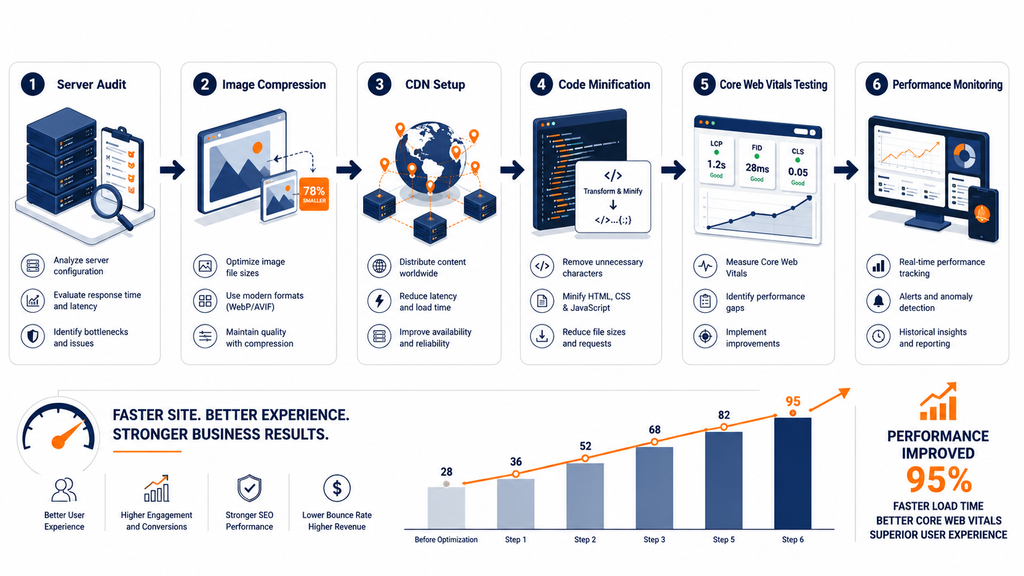
Direct Answer: A structured B2B site speed optimization programme follows a six-stage technical workflow from baseline audit and field data collection through Core Web Vitals remediation and ongoing regression monitoring.
Below is the exact technical framework followed by our performance engineers on every enterprise B2B engagement:
- Baseline Audit and Field Data Collection: Pull Google Search Console Core Web Vitals field data across all page groups including homepage, product pages, blog templates, and landing pages. Identify which specific URL templates fail LCP, INP, or CLS thresholds. Run PageSpeed Insights diagnostics on the top five highest-traffic page templates.
- Server and Hosting Infrastructure Review: Benchmark TTFB across multiple geographic regions using WebPageTest.org. Identify whether TTFB failures originate from server processing time, network latency, or CDN misconfiguration.
- Image and Media Optimization Sprint: Audit all images across priority page templates. Convert JPEG and PNG assets to WebP or AVIF. Add explicit width and height attributes to every image element. Implement lazy loading for all below-the-fold images while keeping hero images eager-loaded for LCP performance.
- JavaScript and CSS Optimization: Audit all synchronously loaded scripts using the Coverage tool in Chrome DevTools. Defer non-critical third-party scripts via Google Tag Manager DOM-ready triggers. Minify CSS, JavaScript, and HTML across all page templates.
- CDN and Server-Side Caching Implementation: Configure full-page caching via Cloudflare, Fastly, or a Redis object cache layer on the origin server. Set appropriate cache-control headers for static assets and configure a cache purge workflow for dynamic content updates.
- Core Web Vitals Verification and Regression Monitoring: Verify improvements using Google Search Console field data after 28 days of real-user data collection. Set up ongoing monitoring alerts for performance regressions introduced by new plugin installations, CMS updates, or additional marketing scripts.
What Are the Pros and Cons of B2B Site Speed Optimization Services?
Direct Answer: The primary benefits are confirmed SEO ranking improvements, faster Googlebot crawl rates, reduced decision-maker bounce rates, and AI search eligibility. The main limitation is that performance regressions from ongoing marketing activity require continuous maintenance rather than a one-time fix.
Pros of Professional B2B Site Speed Optimization
- Confirmed SEO ranking impact: Core Web Vitals are a Google ranking signal per Google’s official page experience documentation
- Faster Googlebot crawl rate: Lower server TTFB directly increases Googlebot’s crawl rate limit, accelerating indexation of newly published B2B content
- Reduced high-value bounce rates: Faster load times reduce the probability of losing senior decision-makers before they reach your value proposition
- AI search eligibility: Pages delivering content within crawler execution timeouts are eligible for Google AI Overviews and ChatGPT Search inclusion
- Lower infrastructure costs: Caching, CDN deployment, and image compression collectively reduce origin server load and monthly bandwidth costs
- Improved conversion rates: Faster pages correlate with higher demo request and contact form submission rates for B2B buyers
Cons of Professional B2B Site Speed Optimization
- Performance regressions are common: Every new marketing script, plugin addition, or CMS update can reintroduce performance issues requiring ongoing monitoring
- Enterprise CMS constraints: Platforms such as HubSpot Enterprise and Salesforce CMS limit the depth of optimizations possible without platform-level architectural changes
- Third-party script trade-offs: Chat tools, CRM integrations, and session recording platforms are often non-negotiable for B2B sales teams but each add measurable load time
- Diminishing returns at high baselines: Sites already scoring above 80 on PageSpeed Insights see smaller marginal improvements than sites starting below 50
What Are the Most Common B2B Site Speed Mistakes Enterprise Teams Make?
Direct Answer: The most frequent B2B site speed errors are loading third-party marketing scripts synchronously, serving hero images in uncompressed legacy formats, and relying on PageSpeed Insights lab scores instead of Google Search Console field data for ranking decisions.
- Loading all marketing scripts synchronously: Every synchronously loaded script including HubSpot tracking, Intercom, Drift, Hotjar, and Google Tag Manager layers blocks page rendering until it fully completes. Non-critical scripts must be deferred or loaded asynchronously to unblock first paint.
- Serving images in JPEG or PNG instead of WebP or AVIF: Modern image formats deliver 25 to 35 percent smaller file sizes than JPEG at equivalent visual quality, per Google’s image optimization guide. Most B2B sites still serve large PNG hero images and product screenshots without any format conversion.
- No server-side caching on CMS pages: Dynamic CMS pages on WordPress or HubSpot that regenerate HTML on every request create unnecessary server load and inflate TTFB. Full-page caching with Redis or a CDN-level cache dramatically reduces response times across all page templates.
- Relying only on PageSpeed Insights lab data: Lab scores simulate performance in a controlled environment. Google Search Console field data from real users is what Google uses for ranking decisions. The two scores frequently differ by significant margins across enterprise B2B sites.
- Ignoring INP (Interaction to Next Paint): Many B2B teams still optimize for old First Input Delay (FID) metrics. Google replaced FID with INP in March 2024 as a Core Web Vital. INP measures all interaction responsiveness across the full page session and is significantly more difficult to fix than FID was.
- Not setting explicit image dimensions in HTML: Images without width and height attributes cause Cumulative Layout Shift (CLS) as the browser recalculates page layout after images finish loading. This is the most common and most easily fixable CLS failure on B2B websites.
- Optimizing for desktop and ignoring mobile: B2B teams often focus on desktop performance because they believe buyers use desktop devices. Google uses mobile-first indexing, meaning mobile Core Web Vitals scores determine rankings for all users regardless of the device they are actually browsing on.
How Do You Ensure AI Search Crawlers Can Access Your Speed-Optimized B2B Pages?
Direct Answer: AI search crawler access requires explicitly allowing specific search-retrieval bots in robots.txt and ensuring CDN and WAF rules do not block them. Technical crawlability is a prerequisite for AI Overview and ChatGPT Search eligibility that is entirely separate from your page speed scores.
According to Google’s Search Central guidance on AI Overviews, pages must be indexed and snippet-eligible to appear as supporting links in AI-generated answers. A technically fast page that blocks the wrong crawlers gains no AI search benefit from its speed improvements whatsoever.
The table below outlines which crawlers must be allowed and which are discretionary decisions that do not affect live AI search retrieval:
| Bot | Engine | Role | Recommendation |
|---|---|---|---|
| OAI-SearchBot, ChatGPT-User | OpenAI | ChatGPT Search live indexation and retrieval | Allow – required for ChatGPT Search inclusion |
| PerplexityBot, Perplexity-User | Perplexity | Perplexity search indexing (not model training) | Allow |
| Claude-SearchBot, Claude-User | Anthropic | Claude search indexing | Allow |
| Googlebot | Core Google index, AI Overviews, AI Mode | Allow – mandatory | |
| GPTBot | OpenAI | Model training only – separate from search | Discretionary – does NOT affect ChatGPT Search |
| ClaudeBot | Anthropic | Model training only – separate from search | Discretionary – does NOT affect Claude Search |
In addition, verify that CDN and WAF rules (Cloudflare, Akamai, Fastly) do not block these bot user-agents, that no noindex or nosnippet tags are applied to AI-targeted pages, and that critical body text and tables are present in the raw initial HTML response rather than rendered exclusively via JavaScript.
Case Study: How a Singapore B2B SaaS Platform Recovered Rankings After Core Web Vitals Failures
Direct Answer: A Singapore-based B2B SaaS platform improved average LCP from 6.2 seconds to 1.9 seconds, recovered 34% of lost organic traffic, and returned to Top 3 rankings for five core commercial keywords within 90 days of a structured Core Web Vitals remediation programme.
The client, CloudOps Pro, is a regional cloud infrastructure management SaaS serving enterprise IT buyers across APAC. Following Google’s Core Web Vitals update, primary product pages dropped from positions 3 to 5 down to positions 12 to 18 for core B2B keywords. Organic demo request volume declined by 41% over the following quarter.
The 90-day remediation programme addressed four root causes:
- Hero Image LCP Failures: The homepage hero image was a 1.8 MB uncompressed JPEG. It was converted to WebP with lazy loading disabled for the above-the-fold element. Result: LCP improved from 6.2s to 1.9s on mobile.
- Render-Blocking Marketing Scripts: HubSpot tracking, Drift chat, Hotjar session recording, and two A/B testing scripts all loaded synchronously. All non-critical scripts were migrated to deferred loading via Google Tag Manager DOM-ready triggers. Result: Time to Interactive improved by 2.3 seconds.
- No Server-Side Caching: The WordPress marketing site generated HTML dynamically on every request. Redis object caching plus Cloudflare full-page caching with a 24-hour TTL was implemented across all static marketing pages. Result: TTFB reduced from 1.4s to 0.3s.
- CLS from Unspecified Image Dimensions: 47 product screenshot images across pricing and feature pages had no explicit width or height attributes. Adding dimension attributes eliminated layout shifts across all affected page templates.
90-Day Outcomes:
- Average LCP: 6.2s to 1.9s (within Google’s “Good” threshold of 2.5s)
- TTFB: 1.4s to 0.3s
- Organic traffic recovery: +34% vs. pre-decline baseline
- Core commercial keyword rankings: Returned to positions 1 to 5
- Monthly demo requests from organic: +28% vs. pre-decline period
How Do You Choose the Right Partner for B2B Site Speed Optimization Services?
Direct Answer: The right B2B site speed optimization partner must demonstrate hands-on Core Web Vitals remediation experience, CMS-specific performance engineering capability, and a verifiable track record of measurable ranking and traffic improvements for enterprise B2B clients.
According to Google Search Console documentation, Core Web Vitals field data is collected from real Chrome users visiting your actual pages. Any agency offering B2B site speed optimization services must work from this field data as their primary diagnostic source, not exclusively from simulated PageSpeed Insights lab scores. Agencies that cannot access or interpret Google Search Console Core Web Vitals field data cannot deliver genuine enterprise performance improvements.
Below is a checklist to evaluate any prospective B2B site speed optimization partner before engagement:
- Do they diagnose using Google Search Console field data, not only PageSpeed Insights lab scores?
- Can they demonstrate CMS-specific experience across WordPress, HubSpot CMS, Drupal, Webflow, or Next.js?
- Do they have a documented CDN configuration and server caching methodology?
- Can they address JavaScript loading order and third-party script management across marketing stacks?
- Do they provide before-and-after Core Web Vitals reports sourced from Google Search Console?
- Can they share verified case studies showing traffic and ranking outcomes, not just score improvements?
- Do they address AI search crawler access separately from traditional Googlebot access?
Key Takeaways
- Core Web Vitals are confirmed Google ranking signals: LCP, INP, and CLS directly affect rankings per Google’s official documentation. Site speed is not optional for B2B SEO.
- Server TTFB controls Googlebot’s crawl rate limit: A faster server response allows Googlebot to crawl more pages per session, directly accelerating indexation of newly published B2B content.
- AI search eligibility requires crawlability first: Allow OAI-SearchBot, PerplexityBot, Claude-SearchBot, and Googlebot. A fast page that blocks these bots gains zero AI citation benefit.
- Field data beats lab data: Google uses Core Web Vitals field data from real users in Google Search Console for ranking decisions, not PageSpeed Insights lab simulations.
- Third-party script bloat is the number one B2B performance problem: Marketing stacks including chat, CRM, analytics, and A/B testing tools are the most common cause of render-blocking delays on enterprise B2B sites.
- Off-page brand mentions correlate with AI visibility: r = 0.664 for web mentions, r = 0.740 for YouTube, per Ahrefs’ 75,000-brand AI Overview study. These are observed correlations, not proven causation.
- Performance regressions are ongoing: Every new marketing script or CMS update can reintroduce speed issues. Continuous monitoring is required, not a one-time audit.
Frequently Asked Questions
What is B2B site speed optimization and how is it different from standard page speed optimization?
B2B site speed optimization applies Core Web Vitals remediation, server infrastructure improvements, and CDN configuration to websites serving enterprise buyers, with specific attention to the heavy third-party marketing script stacks common in B2B sales cycles. Standard page speed optimization often addresses only image compression and code minification, without resolving the server-side TTFB bottlenecks and render-blocking script dependencies that are the primary performance challenges on enterprise B2B platforms.
How long does it take to see ranking improvements from Core Web Vitals optimization?
Core Web Vitals improvements typically become visible in Google Search Console’s Core Web Vitals report within 28 days of implementation, as Google collects new field data from real users visiting the optimized pages. Ranking improvements linked to the Core Web Vitals page experience signal generally follow within one to three Google crawl cycles, which can take 30 to 90 days depending on your site’s crawl frequency and the volume of affected page templates.
Do I need to optimize for mobile performance even if my B2B buyers are mostly on desktop?
Mobile performance optimization is mandatory regardless of your actual traffic device split, because Google uses mobile-first indexing. Google’s mobile Googlebot determines your rankings and Core Web Vitals scores for all ranking purposes, even for sites with predominantly desktop audiences. Per Google’s mobile-first indexing documentation, your mobile page experience is the authoritative ranking signal Google uses across all devices.
140-character summary: B2B site speed optimization services fix Core Web Vitals, reduce TTFB, and ensure AI crawlers can access your pages to boost rankings and GEO visibility.
