
For large-scale enterprise websites, e-commerce platforms, and SaaS portals managing thousands of URLs, how efficiently search engine bots crawl your site determines how quickly new pages rank. When Googlebot visits your site, it operates within a fixed allocation of resources known as a crawl budget. If that budget is wasted on duplicate content, redirects, or low-value pages, your most critical commercial pages may go unindexed for weeks. Investing in professional crawl budget optimization services is the most reliable way to ensure every important page on your site is discovered and ranked promptly.
Consequently, neglecting crawl budget is one of the most common reasons large websites stall in organic growth despite strong backlink profiles. Search engines will not rank what they cannot crawl and index efficiently. Understanding why modern enterprises prioritize crawl budget optimization services is the first step toward unlocking the full indexation potential of your website.
What is Crawl Budget and Why Does It Matter for Enterprise SEO?
Direct Answer: Crawl budget is the number of pages Googlebot will crawl on your website within a given timeframe, determined by your site’s crawl rate limit and crawl demand.
According to Google’s official Search Central documentation, crawl budget is a critical concept for websites with more than 1,000 URLs. Sites with millions of pages, frequent content updates, or complex faceted navigation are most at risk of having high-value pages left unindexed. If Googlebot spends the majority of its allocated visits crawling low-quality, duplicate, or blocked pages, your revenue-generating product and service pages suffer.
There are two core components that define crawl budget:
- Crawl Rate Limit: The maximum number of simultaneous connections Googlebot will make to avoid overloading your server.
- Crawl Demand: How much Google wants to crawl your pages, based on their perceived importance and how frequently they update.
Wasting crawl demand on low-value URLs is equivalent to sending your sales team to the wrong office. Professional crawl budget optimization services redirect that bot traffic toward the pages that convert.
Why Should Enterprise Brands Invest in Crawl Budget Optimization Services?
Direct Answer: These services fix indexation bottlenecks, reduce time-to-rank for new pages, and directly improve organic search revenue for large-scale websites.
According to Ahrefs’ Technical SEO Study, a significant percentage of enterprise websites have large volumes of URLs that are either duplicate, thin, or non-canonical, which collectively drain crawl budget. When planning crawl budget optimization services, technical SEO engineers systematically remove this waste to free up Googlebot’s resources. This ensures that your most commercially valuable pages receive frequent crawl visits and are indexed rapidly after publication.
Specifically, the optimization workflow is divided into distinct operational channels. The table below outlines how to organize these activities to maximize crawl efficiency.
| Optimization Layer | Key Deliverables & Tactical Focus | Primary KPI Tracked |
|---|---|---|
| Server Log Analysis | Identifying which URLs Googlebot is visiting and wasting time on. | Crawl frequency per URL segment |
| URL Canonicalization | Resolving duplicate content issues with canonical tags and 301 redirects. | Duplicate URL count |
| Sitemap Optimization | Ensuring only indexable, high-value URLs appear in XML sitemaps. | Sitemap coverage ratio |
| Internal Linking Audit | Strengthening links to priority pages and removing orphan URLs. | Internal link depth score |
| Robots.txt Refinement | Blocking Googlebot from crawling non-indexable parameters and facets. | Blocked URL volume |
| Page Speed Optimization | Reducing server response times to increase Googlebot’s crawl rate limit. | Core Web Vitals score |
In addition, by executing professional crawl budget optimization services, enterprise brands can accelerate their time-to-rank for newly published content. When Googlebot no longer wastes resources on low-value pages, it revisits your priority pages faster, helping fresh guides, product pages, and landing pages appear in search results within days rather than weeks.
How Do You Identify Crawl Budget Waste on a Large Website?
Direct Answer: Crawl budget waste is identified by analyzing Googlebot server log data and comparing crawled URLs against your site’s canonical, indexable URL list.
According to Semrush’s Enterprise SEO Guide, server log analysis is the single most precise method to diagnose crawl budget inefficiencies. Log files reveal exactly which pages Googlebot visited, how often, and how much time it spent on each. Cross-referencing this data against your list of high-value commercial pages immediately identifies which low-value URL segments are consuming resources.
Below are the most common sources of crawl budget waste discovered during technical audits:
| Waste Category | Technical Cause | Recommended Fix |
|---|---|---|
| URL Parameter Duplication | Faceted navigation, session IDs, or tracking tags create hundreds of duplicate URLs. | Add canonical tags or configure parameter handling in Google Search Console. |
| Soft 404 Pages | Pages returning HTTP 200 status codes but displaying no useful content. | Return proper 404/410 status codes or redirect to relevant live pages. |
| Redirect Chains | Multi-hop redirects (301 -> 301 -> 200) slow down crawl speed. | Consolidate all chains into single 301 redirects pointing to the final URL. |
| Orphan Pages | Pages with zero internal links that Googlebot cannot discover. | Add contextual internal links from high-authority hub pages. |
| Blocked Resources | CSS, JavaScript, or image files blocked in robots.txt preventing rendering. | Audit robots.txt and allow Googlebot to access rendering resources. |
| Thin or Duplicate Content | Near-identical pages created by CMS pagination or product variants. | Implement noindex tags or consolidate pages with canonical attributes. |
What is the Step-by-Step Framework for Crawl Budget Optimization?
Direct Answer: A structured crawl budget optimization campaign follows a six-stage technical workflow from server log analysis through ongoing crawl monitoring.
Below is the exact step-by-step technical framework followed by our technical SEO engineers:
- Server Log Collection and Parsing: Extract Googlebot request logs from your web server (Apache, Nginx, or CDN logs) and parse them using a log analysis tool like Screaming Frog Log File Analyser or Splunk.
- Crawl Waste Identification: Identify URL segments receiving high crawl frequency but delivering zero organic traffic or impressions in Google Search Console.
- Robots.txt and Crawl Directive Audit: Review robots.txt directives, noindex tags, and canonical attributes across all URL segments to ensure instructions are consistent and error-free.
- XML Sitemap Cleanup: Remove all non-canonical, noindexed, redirected, or error pages from your XML sitemaps so Googlebot follows only clean, indexable URL paths.
- Internal Link Architecture Restructuring: Audit internal link depth across the site to ensure all priority commercial pages are reachable within three clicks from the homepage.
- Core Web Vitals and Server Speed Optimization: Optimize TTFB (Time to First Byte) and page load speeds to increase Googlebot’s crawl rate limit, allowing more pages to be crawled per session.
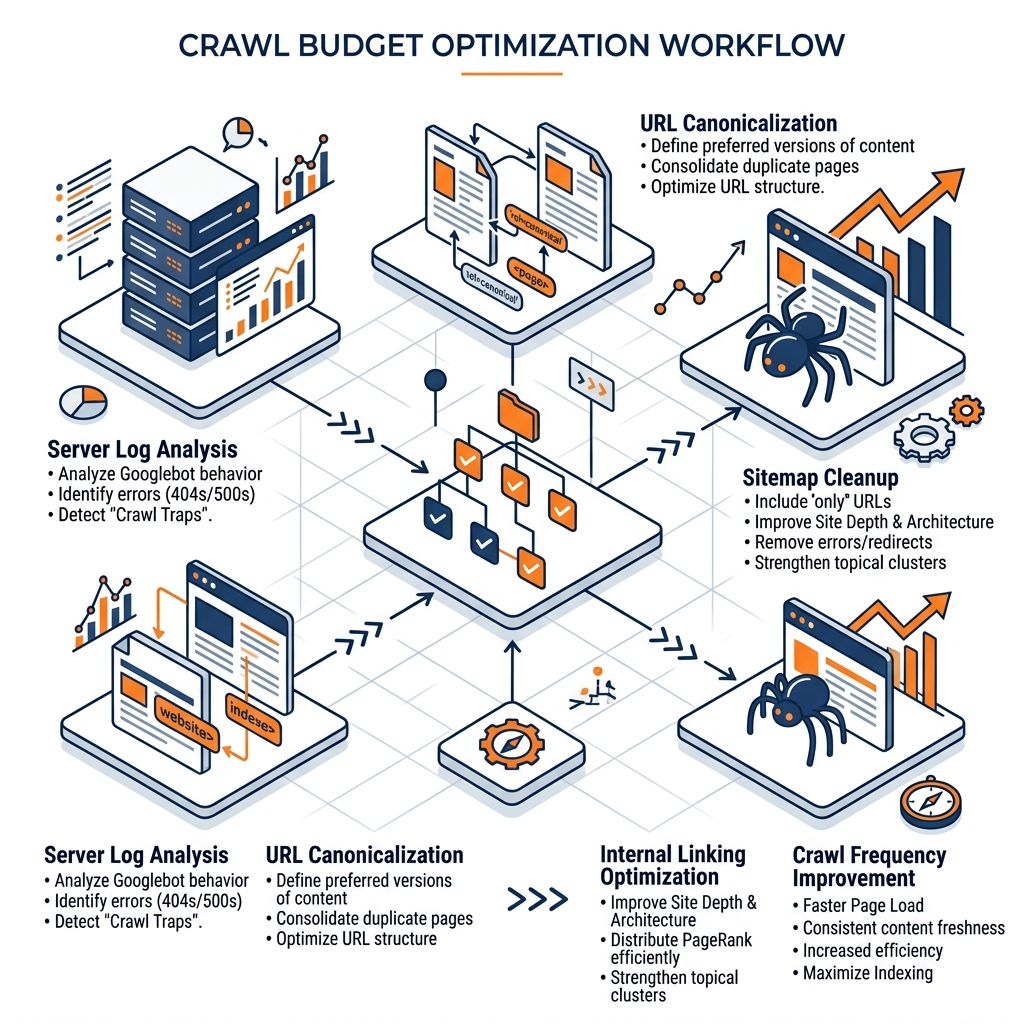
Implementing this workflow allows your technical team to redirect Googlebot toward your highest-converting pages. Consequently, you can expect measurably faster indexation of new content and stronger rankings for priority commercial terms.
Pros and Cons of Crawl Budget Optimization Services
Pros
- Faster Indexation: New pages are discovered and ranked in days rather than weeks.
- Improved Page Authority Distribution: Internal link restructuring concentrates authority on revenue-generating pages.
- Lower Server Costs: Blocking unnecessary crawls reduces server load from automated bot traffic.
- Scalable SEO Foundation: A clean crawl architecture supports long-term growth without diminishing returns.
Cons
- Requires Technical Expertise: Incorrect robots.txt directives or noindex placements can accidentally block important pages.
- Results Take Time: The full impact of crawl budget changes is typically visible over 60 to 120 days as Googlebot re-crawls affected URL segments.
- Ongoing Maintenance: New content, CMS updates, and platform migrations can reintroduce crawl waste over time.
How Did a Regional E-Commerce Platform Recover its Organic Rankings?
Direct Answer: A Singapore-based B2B e-commerce platform recovered 14,000 indexed pages and grew organic revenue by SGD 280,000 after a structured crawl budget optimization campaign.
Our subject is TechSupply Pro, a regional B2B e-commerce platform for industrial technology procurement. Despite publishing hundreds of new product pages monthly, TechSupply Pro’s organic traffic had stalled for six consecutive months. A preliminary audit revealed that over 68,000 URLs generated by faceted navigation filters were consuming Googlebot’s entire crawl budget, leaving 14,000 core product pages unindexed.
They engaged Windel Solutions to execute a full crawl budget optimization services campaign, beginning with a server log audit and sitemap cleanup.
“Crawl budget is a finite resource. When enterprises let low-value, auto-generated URLs consume Googlebot’s allocation, they are effectively locking their best content out of search results.” Matthew Windel, Chief Executive Officer at Windel Solutions.
The agency ran a 90-day remediation campaign with the following technical implementation plan and results:
- Campaign Duration: 90 Days
- URLs Removed from Sitemap: 68,000+ faceted navigation duplicates
- Core Pages Re-Indexed by Googlebot: 14,000 previously orphaned product pages
- Organic Traffic Recovery: +112% within 90 days
- Crawl Frequency on Priority Pages: Increased from once per 21 days to once per 4 days
- Organic Pipeline Generated: SGD 280,000 in recovered contract opportunities
This case study demonstrates how professional crawl budget optimization services protect your organic search investment and unlock significant pipeline value.
What are the Most Common Crawl Budget Mistakes Enterprises Make?
Direct Answer: The most frequent crawl budget errors are failing to block faceted navigation URLs, maintaining bloated XML sitemaps, and allowing redirect chains to persist across the site.
When managing large-scale websites, some technical teams overlook the compounding effect of small crawl inefficiencies. An expert managing crawl budget optimization services will immediately flag these recurring issues:
- Not Configuring Faceted Navigation: E-commerce platforms with filters (size, color, price) can generate millions of low-value URL variants. These must be blocked in robots.txt or handled with canonical tags.
- Submitting Broken URLs in Sitemaps: According to Google Search Central, sitemaps should only include canonical, indexable URLs returning HTTP 200 status codes. Submitting redirected or noindexed URLs wastes Googlebot’s resources.
- Ignoring Orphan Pages: Newly published blog posts or landing pages without internal links may never be discovered by Googlebot regardless of their quality.
- Blocking JavaScript Resources: Modern JavaScript-heavy SPAs (Single Page Applications) can accidentally block rendering resources in robots.txt, preventing Googlebot from seeing page content.
How to Choose a Partner for Crawl Budget Optimization Services?
Direct Answer: The ideal technical SEO partner must demonstrate expertise in server log analysis, crawl directive configuration, and site architecture restructuring.
Selecting the right technical SEO agency requires verifying their engineering capabilities. A content-focused agency might focus on keyword insertion that fails to address the underlying crawl infrastructure. Therefore, evaluating agencies to deliver your crawl budget optimization services requires looking for hands-on technical engineering experience.
The checklist below outlines the key criteria your team should evaluate during the selection process:
- Server Log Analysis Capability: Can they parse and interpret raw Googlebot request logs from your server?
- Crawl Directive Expertise: Do they have experience configuring robots.txt, noindex tags, and canonical attributes at scale?
- Internal Link Architecture: Can they audit and restructure your site’s internal linking to improve crawl depth?
- Search Console Integration: Do they monitor crawl stats reports in Google Search Console on an ongoing basis?
- Case Study Verification: Can they share verified examples of crawl budget remediation improving organic traffic for enterprise clients?
Conclusion
Crawl budget is a finite, shared resource between your website and Googlebot. Every page crawled unnecessarily is a direct cost paid by your most important commercial pages being indexed more slowly. By investing in professional crawl budget optimization services, enterprise brands can ensure their SEO budget translates into measurable organic revenue growth.
- Audit Server Logs First: Log analysis is the most precise diagnostic tool for identifying crawl waste.
- Clean Your Sitemaps: Submit only canonical, indexable URLs to prevent Googlebot from following dead-end paths.
- Block Faceted Navigation: Use robots.txt directives and canonical tags to prevent URL duplication from filters and parameters.
- Fix Redirect Chains: Consolidate all multi-hop redirects into single 301 redirects pointing directly to the live page.
- Monitor Crawl Stats Continuously: Use Google Search Console’s Crawl Stats report to track Googlebot’s behavior after implementing fixes.
Frequently Asked Questions
What is crawl budget and does it affect small websites?
Crawl budget is the number of pages Googlebot will crawl on your site within a given period, determined by your server’s crawl rate limit and the search engine’s crawl demand. According to Google’s Search Central documentation, crawl budget is primarily a concern for websites with over 1,000 URLs, frequent content updates, or complex faceted navigation.
How long does it take to see results from crawl budget optimization?
Crawl budget optimization results are typically measurable within 60 to 120 days after implementation, as Googlebot needs time to re-crawl and re-index affected URL segments. Faster results are seen in the Crawl Stats report within Google Search Console, where improvements in crawl frequency on priority pages become visible within 30 days.
Can incorrect robots.txt settings harm my website’s rankings?
Incorrect robots.txt directives can accidentally block Googlebot from crawling critical pages, rendering resources, or JavaScript files required to render page content. This is one of the highest-risk areas of technical SEO and requires expert review before any changes are deployed to a production environment.
