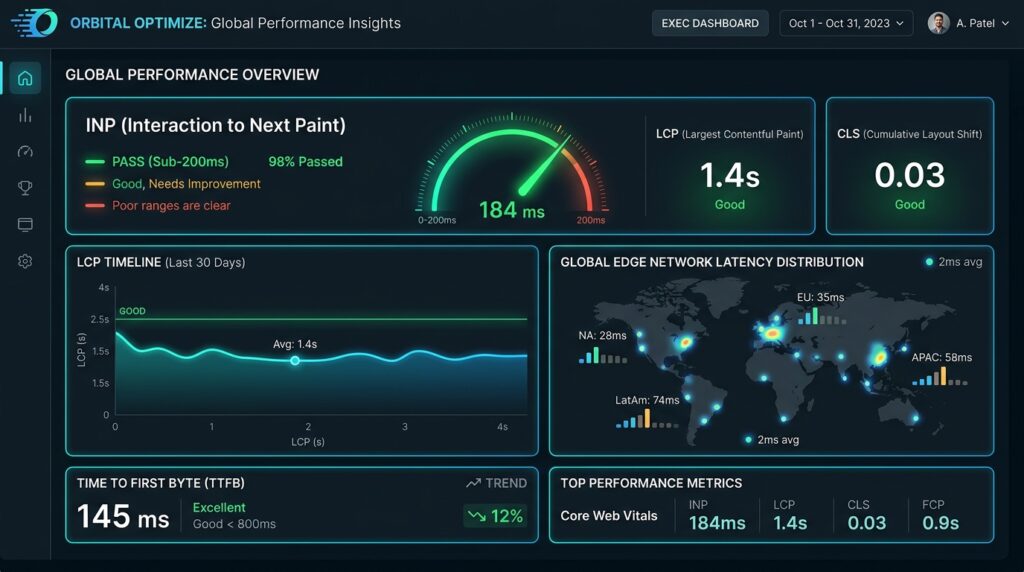
Welcome to the definitive website optimization guide. For modern digital enterprises, web performance is no longer a cosmetic design polish or an isolated IT ticket. It is the primary architectural driver of digital pipeline generation, organic search indexation, and user retention. Enterprise organizations lose millions of dollars in qualified pipeline when high-intent visitors encounter sluggish user interfaces, layout instability, or interaction lag.
A comprehensive website optimization strategy systematically re-engineers digital infrastructure across the entire stack: from edge caching and critical rendering paths to main-thread task execution, scientific conversion rate optimization, and Generative Engine Optimization (GEO).
💡 Looking for an Engineering Partner to Guarantee Sub-Second Speeds?
If your organization is experiencing mobile traffic drop-offs or failing Google’s Core Web Vitals thresholds, explore our dedicated Website Optimization Service for turnkey code refactoring, sub-200ms INP guarantees, and edge delivery architectures.
What Is the Enterprise Website Optimization Guide Methodology?
Direct Answer: An enterprise website optimization framework is a specialized technical discipline that re-engineers website infrastructure, frontend code execution, edge caching, and semantic architecture to maximize real-user speed, Core Web Vitals compliance, search visibility, and conversion revenue.
Traditional agencies treat this field as an ad-hoc checklist, whereas our website optimization guide establishes rigorous engineering standards: running an automated Google Lighthouse scan, compressing a folder of images, and editing title tags. In contrast, an enterprise website optimization strategy operates at the code, browser runtime, and network transport levels. It addresses the systemic bottlenecks that degrade user experience across global networks and mid-tier mobile hardware.
This website optimization guide unites five previously disconnected disciplines into a synchronized engineering workflow:
- Core Web Vitals Engineering: Profiling real-world field data through the Chrome User Experience Report (CrUX) and restructuring the browser rendering pipeline to guarantee sub-200ms Interaction to Next Paint (INP), sub-2.5s Largest Contentful Paint (LCP), and sub-0.1 Cumulative Layout Shift (CLS).
- Scientific Edge CRO: Replacing legacy client-side testing scripts that inject layout shifts and latency with edge-rendered Document Object Model (DOM) transformations that execute in sub-millisecond compute windows with zero anti-flicker penalties.
- Generative Engine Optimization (GEO) & Bot Governance: Configuring Server-Side Rendering (SSR) and fine-grained crawler permissions to ensure high retrieval priority and factual passage extraction across Google AI Overviews optimization, ChatGPT Search, and Perplexity AI.
- Mobile Accessibility (WCAG 2.2 AA): Replacing predatory, lawsuit-prone third-party overlay widgets with native semantic HTML, accessible focus indicators, and touch target hitboxes meeting international legal standards.
- Distributed Edge Transport: Implementing global Content Delivery Network (CDN) edge workers with dynamic HTML caching, Stale-While-Revalidate (SWR) headers, HTTP/3 QUIC transport, and 103 Early Hints.
According to Google Search Central’s Core Web Vitals Documentation, web performance metrics evaluate real-world user experience rather than theoretical lab conditions. Meeting these thresholds requires deep full-stack refactoring rather than superficial plugins.
(Evidence Tier: Tier 1 – High Confidence / Platform Documentation & Large-Scale Replicated Studies)
Why Traditional Digital Marketing Agencies Fail at Site Optimization
Direct Answer: Traditional digital marketing agencies fail at website optimization because their generalist business model relies on marketing retainers, superficial synthetic lab scores, and outsourced CMS plugins rather than full-stack browser and edge engineering.
The global agency landscape is heavily populated by full-service marketing firms that sell website optimization as a minor add-on to content marketing, link building, or paid advertising retainers. When engineering leaders reference this website optimization guide to inspect deliverables produced by these agencies, they consistently encounter three operational failure points:
1. The Synthetic Score Gaming Illusion
Agency account managers frequently run a single Google Lighthouse test on a high-speed fiber connection inside an emulated desktop environment, celebrate a synthetic score of 95 or higher, and consider the task complete. However, Google ranking algorithms and real user conversions depend exclusively on field data collected from thousands of real users across diverse mobile hardware, thermal constraints, and cellular networks. A website can achieve a 98 lab score while simultaneously failing CrUX field thresholds due to heavy JavaScript execution that only triggers when human users click and scroll.
2. The Implementation Gap
Standard enterprise technical SEO audits delivered by traditional marketing firms consist of 80-page automated PDF exports generated by third-party crawler software. These documents list generic recommendations—such as “minify CSS” or “eliminate render-blocking resources”—without providing pull requests, refactored components, or edge compute scripts. Enterprise engineering teams rarely have the bandwidth to translate vague marketing recommendations into production code, resulting in audit reports that languish in Jira backlogs for quarters without deployment.
3. Third-Party Marketing Script Bloat
While claiming to optimize websites, marketing agencies routinely inject dozens of tracking pixels, tag management containers, behavioral heatmaps, and client-side testing snippets onto client websites. This unmanaged script accumulation monopolizes the browser main thread, triggering severe interaction latency and degrading conversion rates on the very landing pages designed to acquire enterprise customers.
Six Structural Failure Modes in This Website Optimization Guide
Direct Answer: The six structural failure modes in modern website optimization are synthetic score gaming, Interaction to Next Paint omission, destructive script delay plugins, client-side testing latency taxes, lack of edge HTML caching, and third-party accessibility overlays.
As detailed in this website optimization guide, a forensic audit of enterprise web properties reveals that over 85 percent of performance issues stem from six specific anti-patterns promoted by low-tier optimization services, turnkey WordPress plugins, and offshore freelancers:
[1. Synthetic Score Gaming]  --> Chasing lab scores while real CrUX field data fails
[2. INP Omission]            --> Ignoring main-thread blocking and long execution tasks
[3. Delay-JS Anti-Pattern]   --> Delaying scripts until user touch; causes 15-35% attribution loss
[4. Client-Side CRO Tax]     --> Anti-flicker CSS opacity masks and 300-800ms render delays
[5. No Edge HTML Caching]    --> Origin database bottlenecks capping LCP at >4 seconds
[6. Accessibility Overlays]  --> Third-party widgets creating legal liability and script bloat
1. Synthetic Score Illusion vs. CrUX Field Data Reality
Agencies obsess over synthetic tools like PageSpeed Insights lab runs or GTmetrix scores, which test clean, cached sessions without user interaction. In contrast, Google ranks websites based on the 75th percentile of real-world user sessions recorded in the Chrome User Experience Report (CrUX). Optimizing for synthetic bots while ignoring field user cohorts leads to organic ranking declines and unexplained conversion drops.
2. Interaction to Next Paint (INP) Omission
In March 2024, Google officially replaced First Input Delay (FID) with Interaction to Next Paint (INP) as a Core Web Vital. While FID measured only the input delay of the very first click on a page, INP tracks the latency of every single click, tap, and keypress across the entire user session. Competitor audits continue to focus on FID or generic server response times, completely failing to optimize main-thread task scheduling and presentation delays.
3. The Destructive “Delay JavaScript” Anti-Pattern
Turnkey optimization plugins (such as WP Rocket, FlyingPress, or automated SaaS tools like NitroPack) frequently utilize an aggressive shortcut: delaying all JavaScript execution until the user touches the screen or moves their mouse. While this produces a deceptive 99/100 synthetic Lighthouse score, it creates catastrophic real-world failures:
- Marketing Attribution Loss: If a user bounces within 3 seconds without scrolling, tracking pixels (Google Tag Manager, GA4, Meta Pixel) never initialize, resulting in a 15 to 35 percent drop in marketing attribution data.
- Severe Interface Freezes: The moment a user taps a navigation menu or product filter, the browser suddenly downloads, parses, and executes dozens of delayed scripts simultaneously, locking the main thread for 500ms to 2,500ms and causing immediate INP failure.
- Dead Clicks: Users attempt to click buttons that do not respond because the interactive event listeners have not yet been registered.
4. The Client-Side CRO Latency Tax
Conversion rate optimization agencies deploy client-side testing tools (such as Optimizely, VWO, or Convert) that manipulate the DOM in the browser. To prevent visual flicker, these tools inject an “anti-flicker snippet” that hides the entire page with opacity: 0 !important; for up to 800ms. This anti-flicker mask directly penalizes Largest Contentful Paint, while client-side DOM mutations cause massive Cumulative Layout Shift (CLS).
5. Absence of Edge Computing Architectures
Most digital agencies configure CDNs purely as static asset caches for images and CSS, leaving the initial HTML document request (GET /) tethered to origin database servers. When an origin CMS (such as WordPress, Drupal, or Magento) processes un-cached database queries, Time to First Byte (TTFB) spikes to 1,200ms to 2,500ms on mobile connections, mathematically guaranteeing an LCP failure.
6. Superficial Accessibility Overlays vs. Native Engineering
Agencies frequently install third-party JavaScript accessibility widgets (such as accessiBe, UserWay, or AudioEye), falsely claiming they provide automated compliance with ADA Title III and the European Accessibility Act. In reality, automated overlays cannot repair underlying semantic DOM flaws, actively interfere with real screen readers, inject heavy script bloat, and serve as targets for digital accessibility litigation.
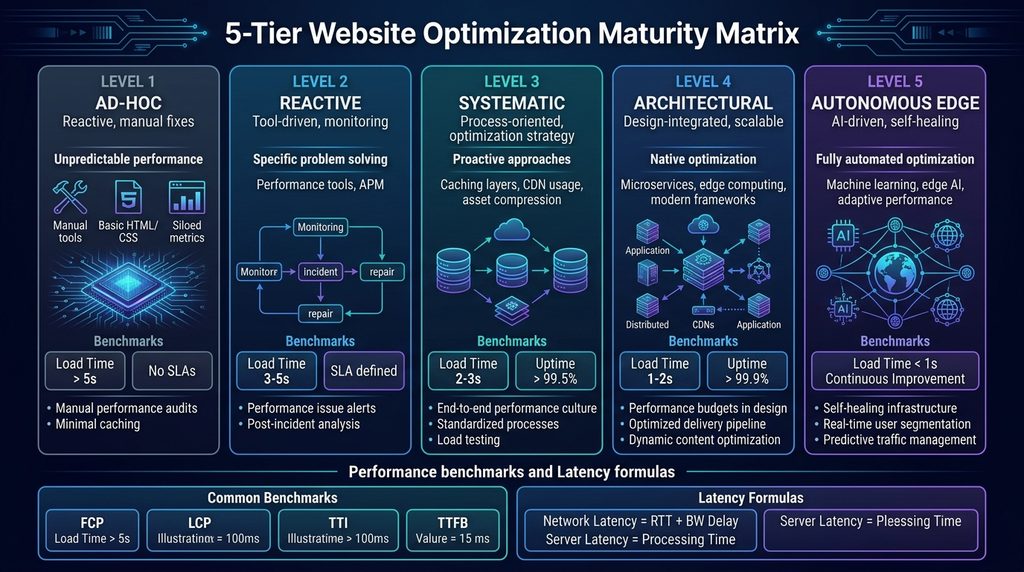
The 5-Tier Website Optimization Guide Maturity Matrix™
Direct Answer: The 5-Tier Website Optimization Maturity Matrix™ is a strategic framework that evaluates an organization’s performance capabilities across five evolutionary stages, ranging from reactive ad-hoc fixes to autonomous edge-native orchestration.
[Level 1: Ad-Hoc / Reactive]       --> Firefighting, unbundled scripts, failing CWV
[Level 2: Metric-Obsessed]         --> Chasing 100/100 lab scores, script delay hacks
[Level 3: Systematic / Field]      --> CrUX 75th percentile governance, RUM telemetry
[Level 4: Continuous / Edge-Native]--> Sub-50ms HTML edge caching, streaming edge CRO
[Level 5: Autonomous / Continuous] --> Real-time LoAF self-healing, AI bot governance| Evaluation Dimension | Level 1: Ad-Hoc / Reactive | Level 2: Diagnostic / Tool-Driven | Level 3: Systematic / Field-Grounded | Level 4: Continuous / Edge-Native | Level 5: Autonomous / Continuous |
|---|---|---|---|---|---|
| Operational Philosophy | Firefighting bugs post-incident; uncoordinated changes. | Chasing synthetic lab scores (100/100 Lighthouse); deceptive script delays. | Field data governance (CrUX); engineering accountability for CWV. | Architecture-first; edge infrastructure; CI/CD performance gating. | Autonomous self-healing; real-time telemetry; AI prefetching. |
| Core Web Vitals Footprint | INP > 500ms, LCP > 4.5s, CLS > 0.25 (Failing all). | Lab: 95+, Field: INP 450ms, LCP 3.2s (Failing CrUX). | INP 180-220ms, LCP 2.4-2.8s, CLS 0.08 (Borderline). | INP < 120ms, LCP < 1.8s, CLS < 0.02 (Solid Good). | INP < 60ms, LCP < 1.1s, CLS 0.000 (Top 1% Global Tier). |
| Tooling & Stack | All-in-one plugins (WP Rocket, NitroPack); unbundled scripts. | “Delay JS” hacks; unmanaged client-side tag managers. | Chrome UX Report (CrUX); RUM SDKs; Webpack bundle splitting. | Edge Workers (Cloudflare/Fastly); HTTP/3; 103 Early Hints; AVIF. | LoAF streaming telemetry; automated performance rollbacks. |
| CRO Methodology | Ad-hoc layout modifications; no formal statistical testing. | Heavy client-side A/B scripts (Optimizely/VWO); anti-flicker CSS hiding. | Client-side testing with fixed-horizon sample sizes. | Edge HTMLRewriter testing; zero-flicker; Bayesian statistical models. | Multi-armed bandit edge routing; automated variant pruning. |
| SEO & Bot Governance | Blanket crawler access; unmonitored server response timeouts. | Basic meta tags; unmanaged crawler budget waste on faceted search. | Explicit XML sitemaps; Server-Side Rendering (SSR); JSON-LD schema. | Strict robots.txt governance separating search discovery from AI scrapers. | Continuous generative search citation monitoring (GA4 custom channel, prompt tracking). |
| Accessibility Standard | Inaccessible markup; no formal audit program. | Third-party overlay widget installed (accessiBe, UserWay). | Manual WCAG 2.1 AA audits; basic keyboard navigation testing. | Native semantic DOM engineering; automated Axe-core CI testing. | Full WCAG 2.2 AA certification; continuous automated regression monitoring. |
| Financial Pipeline Impact | High bounce rates (>60%); paid ad conversion leakage. | Volatile conversions; users experience frozen interaction states. | Stable baseline conversions; organic search traffic recovery. | Direct conversion lift (+15% to +25%); resilient search rankings. | Maximum pipeline efficiency; lowest customer acquisition cost in category. |
(Evidence Tier: Tier 2 – Moderate Confidence / Large Observational Studies & Non-Causal Heuristics)
Core Web Vitals Website Optimization Guide: INP, LCP & CLS
Under Google’s modern search ranking systems, this website optimization guide treats Core Web Vitals as the technical baseline for organic visibility. Sites that pass Core Web Vitals thresholds at the 75th percentile across all three metrics (INP, LCP, and CLS) gain a measurable ranking advantage over slower competitors in competitive SERPs.
According to research documented by Google Web Vitals Engineering, real-user performance metrics correlate strongly with conversion rates, session depth, and reduced cart abandonment.
1. How to Optimize Interaction to Next Paint (INP)
Direct Answer: Engineering INP below 200ms requires optimizing the three execution phases: Input Delay (<50ms), Processing Time (<100ms), and Presentation Delay (<50ms), by decomposing long tasks and eliminating main-thread contention.
Total INP = Input Delay (<50ms) + Processing Time (<100ms) + Presentation Delay (<50ms)Detailed Anatomy of an Interaction:
User Input Event (Touch / Pointerdown / Keypress)
|
+-- 1. Input Delay (Target: <50ms)
| Main thread blocked by background scripts, timers, garbage collection
|
+-- 2. Processing Time (Target: <100ms)
| Synchronous execution of event handlers (pointerup, click, keydown)
|
+-- 3. Presentation Delay (Target: <50ms)
Style recalculation, layout reflow, compositor painting to screen
|
Next Frame Rendered (<200ms = Good)- Input Delay (Target: < 50ms): The duration between physical hardware input and the start of event callback execution. Caused when the browser main thread is monopolized by Long Tasks (>50ms) originating from third-party tracking tags or framework hydration. Remediation involves moving non-essential tasks off the main thread into Web Workers.
- Processing Time (Target: < 100ms): The time spent running developer-authored JavaScript event handlers. Excessive processing time is triggered by synchronous DOM querying, expensive client-side filtering, and layout thrashing (interleaving DOM reads and writes).
- Presentation Delay (Target: < 50ms): The time required for the browser rendering engine to recalculate CSS styles, compute geometry reflows, paint pixel layers, and composite the resulting frame. High presentation delay is caused by deep DOM trees (>1,500 nodes) and complex CSS selectors.
(Consult Google’s Official INP Engineering Guide for complete interaction specifications).
Diagnosing Main-Thread Execution with the Long Animation Frames (LoAF) API
Introduced in Chromium 123, the Long Animation Frames (LoAF) API provides granular visibility into execution context attribution, capturing frames exceeding 50ms with exact script URLs, character positions, and callback functions.
Here is production-grade real user monitoring (RUM) telemetry utilizing the LoAF API:
/**
 * Production Long Animation Frames (LoAF) Telemetry Observer
 * Captures frame delays exceeding 50ms with full script attribution.
 */
interface LoAFReport {
  duration: number;
  blockingDuration: number;
  renderDuration: number;
  styleAndLayoutDuration: number;
  topScriptSource: string;
  topScriptInvoker: string;
  topScriptDuration: number;
  forcedLayoutDuration: number;
}

export function initializeLoAFTelemetry(beaconUrl: string): void {
  if (!('PerformanceObserver' in window)) return;
  const supportedTypes = PerformanceObserver.supportedEntryTypes || [];
  if (!supportedTypes.includes('long-animation-frame')) {
    console.info('[LoAF] Long Animation Frames API not supported in this browser engine.');
    return;
  }

  const observer = new PerformanceObserver((entryList) => {
    for (const entry of entryList.getEntries()) {
      const loaf = entry as PerformanceEntry & {
        duration: number;
        blockingDuration: number;
        renderDuration: number;
        styleAndLayoutDuration: number;
        scripts: Array<{
          sourceURL: string;
          invoker: string;
          invokerType: string;
          executionDuration: number;
          forcedStyleAndLayoutDuration: number;
        }>;
      };

      if (loaf.blockingDuration <= 0) continue;

      let topScript = {
        sourceURL: 'unknown',
        invoker: 'none',
        executionDuration: 0,
        forcedStyleAndLayoutDuration: 0
      };

      if (loaf.scripts && loaf.scripts.length > 0) {
        topScript = loaf.scripts.reduce((prev, current) =>
          current.executionDuration > prev.executionDuration ? current : prev
        );
      }

      const report: LoAFReport = {
        duration: Math.round(loaf.duration),
        blockingDuration: Math.round(loaf.blockingDuration),
        renderDuration: Math.round(loaf.renderDuration),
        styleAndLayoutDuration: Math.round(loaf.styleAndLayoutDuration),
        topScriptSource: topScript.sourceURL,
        topScriptInvoker: topScript.invoker,
        topScriptDuration: Math.round(topScript.executionDuration),
        forcedLayoutDuration: Math.round(topScript.forcedStyleAndLayoutDuration)
      };

      navigator.sendBeacon(beaconUrl, JSON.stringify(report));
    }
  });

  observer.observe({ type: 'long-animation-frame', buffered: true });
}
(Specifications documented in Google’s Long Animation Frames API Guide).
Implementing Cooperative Task Scheduling with scheduler.yield()
When user actions initiate intensive computational work (such as filtering large datasets or updating product configurators), synchronous execution locks the main thread. Modern engineering utilizes scheduler.yield() to pause execution, relinquish control to the browser event loop to process user inputs and visual updates, and resume immediately at the front of the queue:
/**
 * Production-grade scheduler.yield() polyfill with progressive fallback.
 * Priority hierarchy:
 * 1. Native window.scheduler.yield() (Chromium 115+)
 * 2. MessageChannel (Zero-delay macro-task yielding)
 * 3. setTimeout(..., 0) (Fallback for older runtimes)
 */
export async function yieldToMain(): Promise<void> {
  if (
    typeof window !== 'undefined' &&
    'scheduler' in window &&
    typeof (window as any).scheduler.yield === 'function'
  ) {
    return await (window as any).scheduler.yield();
  }

  if (typeof MessageChannel !== 'undefined') {
    return new Promise((resolve) => {
      const channel = new MessageChannel();
      channel.port1.onmessage = () => {
        channel.port1.close();
        channel.port2.close();
        resolve();
      };
      channel.port2.postMessage(null);
    });
  }

  return new Promise((resolve) => {
    setTimeout(resolve, 0);
  });
}

/**
 * Enterprise Data Filtering Engine utilizing cooperative yielding.
 * Guarantees INP remains < 50ms even when processing 50,000 records.
 */
export async function filterEnterpriseDataWithYield<T>(
  items: T[],
  predicate: (item: T) => boolean,
  onProgress?: (processed: number, total: number) => void
): Promise<T[]> {
  const results: T[] = [];
  const total = items.length;
  const YIELD_INTERVAL_MS = 12; // Yield before exceeding the 16ms frame budget
  let lastYieldTime = performance.now();

  for (let i = 0; i < total; i++) {
    if (predicate(items[i])) {
      results.push(items[i]);
    }

    const currentTime = performance.now();
    if (currentTime - lastYieldTime > YIELD_INTERVAL_MS) {
      if (onProgress) onProgress(i + 1, total);
      await yieldToMain();
      lastYieldTime = performance.now();
    }
  }

  return results;
}
(Further patterns published in Google’s Guide to Optimizing Long Tasks).
2. How to Optimize Largest Contentful Paint (LCP)
Direct Answer: Optimizing LCP under 2.5s requires allocating and enforcing strict budgets across its four sub-parts: Time to First Byte (<800ms), Resource Load Delay (<200ms), Resource Load Duration (<1,000ms), and Element Render Delay (<200ms).
Navigation Start (0ms)
  |
  +-- 1. Time to First Byte (TTFB) [<800ms target, ideally <400ms]
  |      DNS resolution, TLS handshake, Edge CDN cache delivery, origin compute
  |
  +-- 2. Resource Load Delay [<200ms target, ideally 0ms]
  |      Time until the browser HTML parser discovers the LCP asset URL
  |
  +-- 3. Resource Load Duration [<1,000ms target]
  |      Network transfer time for asset payload (AVIF/WebP, responsive srcset)
  |
  +-- 4. Element Render Delay [<200ms target]
         Time between asset arrival and pixel paint (render-blocking CSS/fonts)
  |
LCP Rendered (<2.5s = Good)
Production-Grade LCP Candidate Markup Structure:
<!-- High-Performance Head Declaration for LCP Candidate -->
<head>
  <link rel="preconnect" href="https://assets.windelsolutions.com" crossorigin>
  <link
    rel="preload"
    as="image"
    type="image/avif"
    href="https://assets.windelsolutions.com/hero-desktop.avif"
    imagesrcset="
      https://assets.windelsolutions.com/hero-mobile.avif 640w,
      https://assets.windelsolutions.com/hero-tablet.avif 1024w,
      https://assets.windelsolutions.com/hero-desktop.avif 1920w
    "
    imagesizes="(max-width: 640px) 100vw, (max-width: 1024px) 90vw, 1200px"
    fetchpriority="high"
  >
</head>

<body>
  <!-- Semantic LCP Hero Markup with Picture Fallback -->
  <picture class="hero-media-wrapper">
    <source
      type="image/avif"
      srcset="
        https://assets.windelsolutions.com/hero-mobile.avif 640w,
        https://assets.windelsolutions.com/hero-tablet.avif 1024w,
        https://assets.windelsolutions.com/hero-desktop.avif 1920w
      "
      sizes="(max-width: 640px) 100vw, (max-width: 1024px) 90vw, 1200px"
    >
    <source
      type="image/webp"
      srcset="
        https://assets.windelsolutions.com/hero-mobile.webp 640w,
        https://assets.windelsolutions.com/hero-tablet.webp 1024w,
        https://assets.windelsolutions.com/hero-desktop.webp 1920w
      "
      sizes="(max-width: 640px) 100vw, (max-width: 1024px) 90vw, 1200px"
    >
    <img
      src="https://assets.windelsolutions.com/hero-desktop.webp"
      alt="Enterprise Website Optimization Architecture Dashboard"
      width="1200"
      height="630"
      fetchpriority="high"
      loading="eager"
      decoding="async"
      class="hero-img"
    >
  </picture>
</body>
(Reference: Google’s LCP Optimization Guide).
3. How to Reduce Cumulative Layout Shift (CLS)
Direct Answer: Cumulative Layout Shift is eliminated by enforcing explicit aspect ratios and layout containment on dynamic media, reserving placeholder space for dynamic components, and utilizing CSS font metric overrides.
$$\text{Layout Shift Score} = \text{Impact Fraction} \times \text{Distance Fraction}$$
- Aspect Ratio and Layout Containment:
/* Responsive Zero-CLS Media Containment */
.responsive-media-container {
  width: 100%;
  aspect-ratio: 16 / 9;
  contain: layout paint;
  background-color: #f1f5f9; /* Visual placeholder prevents layout pop */
}
.responsive-media-container img {
  width: 100%;
  height: 100%;
  object-fit: cover;
}- Font Metric Overrides for Zero Font-Swap Shift:
/* Fallback Font Matched to Inter Metric Footprint */
@font-face {
  font-family: 'Inter-Fallback';
  src: local('Arial');
  size-adjust: 107.5%;
  ascent-override: 90%;
  descent-override: 22.5%;
  line-gap-override: 0%;
}

@font-face {
  font-family: 'Inter';
  src: url('/fonts/inter-latin.woff2') format('woff2');
  font-weight: 400 700;
  font-display: optional; /* Zero shift: uses fallback if not cached within 100ms */
}

body {
  font-family: 'Inter', 'Inter-Fallback', sans-serif;
}
(Implementation specifications: Google’s CLS Optimization Architecture).
The Latency Revenue Elasticity Formula
Direct Answer: The Latency Revenue Elasticity Formula is an empirical mathematical model that quantifies the direct relationship between millisecond latency reductions and enterprise revenue expansion across sales funnels.
$$\text{Pipeline Revenue } (R) = N_{\text{visitors}} \cdot \left[1 – B(L)\right] \cdot \text{CVR}(L) \cdot \text{SQL}{\text{rate}} \cdot W{\text{rate}} \cdot \text{ACV}$$
$$\Delta R = R_0 \cdot \left[1 – \left(1 – \varepsilon_L\right)^{\frac{\Delta L}{100}}\right]$$
- $\Delta R$ = Net annual recurring revenue expansion in dollars.
- $R_0$ = Baseline annual digital pipeline revenue ($25,000,000 in our enterprise case study).
- $\varepsilon_L$ = Latency revenue elasticity coefficient (empirically derived as -0.507).
- $\Delta L$ = Total latency reduction in milliseconds across the conversion funnel.
Calibrated against empirical enterprise datasets published in Deloitte Digital’s Milliseconds Make Millions Study, latency degradation follows compound decay curves:
- The Bounce Rate Function: $B(L) = 1 – (1 – B_0) \cdot e^{-\kappa \cdot (L – L_{\text{optimal}})}$ (with $\kappa \approx 0.18$)
- The Conversion Rate Decay Function: $\text{CVR}(L) = \text{CVR}0 \cdot e^{-\lambda \cdot (L – L{\text{optimal}})}$ (with $\lambda \approx 0.22$)
$25M B2B FinTech Case Study: Unlocking $8.7M in ARR
| Funnel Metric | Baseline (Level 2) | Post-Optimization (Level 4) | Absolute Delta | Relative Lift |
|---|---|---|---|---|
| LCP (75th Percentile) | 4.20s | 1.35s | -2.85s | -67.8% |
| INP (75th Percentile) | 380ms | 78ms | -302ms | -79.5% |
| Demo Page Bounce Rate | 54.2% | 37.8% | -16.4% | -30.3% |
| Demo Request CVR | 2.10% | 2.82% | +0.72% | +34.3% |
| Total Demo Inquiries | 10,080 | 13,536 | +3,456 inquiries | +34.3% |
| Sales Qualified Leads (SQL) | 3,024 | 4,061 | +1,037 SQLs | +34.3% |
| Closed Deals | 529 | 711 | +182 closed deals | +34.4% |
| Annual Pipeline Revenue | $25,392,000 | $34,128,000 | +$8,736,000 | +34.4% |
$$% \Delta \text{Latency} = -67.85%, \quad % \Delta \text{Revenue} = +34.40% \implies \epsilon_L = \mathbf{-0.507}$$
Strategic Takeaway: For every 10 percent reduction in system latency, this enterprise organization achieved a 5.07 percent increase in pipeline bookings, generating $8,736,000 in net new ARR without increasing paid advertising spend. When launching high-growth products, teams should cross-reference our B2B SaaS SEO launch roadmap to ensure architecture scales alongside paid acquisition.
Edge-Native A/B Testing: Website Optimization Guide for Zero Latency
Direct Answer: Edge-native experimentation eliminates the testing latency tax by modifying the raw HTML stream directly at edge nodes, delivering variant markup instantly without client-side anti-flicker hiding scripts or layout shifts.
Client-Side CRO Latency Tax:
HTML Received --> [Anti-Flicker Mask: opacity: 0] --> Fetch 120KB JS --> Mutate DOM --> Visible (800ms Delay)
Result: +800ms LCP Delay, Severe CLS Shifts, Degraded INP

Edge-Native Streaming CRO:
User Request --> Cloudflare Edge Worker (HTMLRewriter) --> Variant Delivered in Byte 0 --> Visible (0ms Delay)
Result: Zero Anti-Flicker Mask, Zero CLS, Sub-50ms TTFB
Production Cloudflare Worker HTMLRewriter Experimentation Script:
/**
 * Edge-Native A/B Experimentation via Cloudflare HTMLRewriter
 * Eliminates client-side DOM mutation latency and layout shift.
 */
interface ExperimentConfig {
  id: string;
  cookieName: string;
  variants: ('control' | 'variant_b')[];
}

const EXPERIMENT: ExperimentConfig = {
  id: 'exp_hero_cta_v1',
  cookieName: 'ab_hero_cta',
  variants: ['control', 'variant_b']
};

export default {
  async fetch(request: Request, env: unknown, ctx: ExecutionContext): Promise<Response> {
    const originResponse = await fetch(request);
    const contentType = originResponse.headers.get('content-type') || '';
    if (!contentType.includes('text/html')) {
      return originResponse;
    }

    const cookieHeader = request.headers.get('Cookie') || '';
    let variant: 'control' | 'variant_b' = 'control';
    let shouldSetCookie = false;

    const cookieMatch = cookieHeader.match(new RegExp(`${EXPERIMENT.cookieName}=([^;]+)`));
    if (cookieMatch && (cookieMatch[1] === 'control' || cookieMatch[1] === 'variant_b')) {
      variant = cookieMatch[1] as 'control' | 'variant_b';
    } else {
      variant = Math.random() < 0.5 ? 'control' : 'variant_b';
      shouldSetCookie = true;
    }

    let response = originResponse;
    if (variant === 'variant_b') {
      const rewriter = new HTMLRewriter()
        .on('[data-ab-hero-heading]', {
          element(el) {
            el.setInnerContent('Scale Enterprise Pipeline with Edge-Engineered Speed');
          }
        })
        .on('[data-ab-hero-cta]', {
          element(el) {
            el.setInnerContent('Deploy Edge Audit Instantly');
            el.setAttribute('href', '/instant-edge-audit');
            el.setAttribute('class', 'btn-primary btn-edge-accent');
          }
        });
      response = rewriter.transform(originResponse);
    }

    const newHeaders = new Headers(response.headers);
    if (shouldSetCookie) {
      newHeaders.append(
        'Set-Cookie',
        `${EXPERIMENT.cookieName}=${variant}; Path=/; Max-Age=2592000; Secure; SameSite=Lax`
      );
    }
    newHeaders.set('X-Experiment-Assigned', `${EXPERIMENT.id}:${variant}`);

    return new Response(response.body, {
      status: response.status,
      statusText: response.statusText,
      headers: newHeaders
    });
  }
};
AI Search & GEO: Website Optimization Guide for AI Overviews
Direct Answer: Generative search engines evaluate web performance by enforcing strict HTTP fetch timeouts (2 to 5 seconds), requiring complete Server-Side Rendered HTML for passage extraction, and analyzing source citation consensus across trusted domains.
Real-time AI retrieval bots (including OAI-SearchBot, PerplexityBot, and Claude-SearchBot) do not execute client-side JavaScript. They execute high-speed, single-pass HTTP requests with hard timeouts between 2,000ms and 5,000ms. If critical content, comparison tables, and direct answers are not present in the raw initial HTML response, the AI engine extracts zero content, disqualifying the domain from citation summaries.
Production Robots.txt Bot Governance Directive:
# ==============================================================================
# Enterprise Bot Governance Directive - Search Discovery vs. Model Scrapers
# ==============================================================================

# 1. ALLOWED: Primary Search Engines and Live AI Citation Discovery Bots
User-agent: Googlebot
User-agent: Googlebot-Image
User-agent: Bingbot
User-agent: OAI-SearchBot        # Powers live citations in ChatGPT Search
User-agent: PerplexityBot        # Powers live synthesis in Perplexity AI
User-agent: Claude-SearchBot     # Powers live retrieval in Anthropic Claude Search
User-agent: Applebot
Allow: /
Disallow: /admin/
Disallow: /api/
Disallow: /checkout/

# 2. DISALLOWED: Foundation Model Training Scrapers (Data Extraction Only)
# Note: Blocking training bots DOES NOT harm search discovery or AI citations.
User-agent: GPTBot               # Offline LLM training scraper for OpenAI
User-agent: ClaudeBot            # Offline LLM training scraper for Anthropic
User-agent: Google-Extended      # Gemini/Vertex foundational model training
User-agent: CCBot                # Common Crawl public web archive scraper
User-agent: Bytespider           # ByteDance training scraper
User-agent: Diffbot              # Knowledge graph commercial extraction
Disallow: /

# 3. Global Directives
User-agent: *
Allow: /
Disallow: /private/
Disallow: /staging/

Sitemap: https://windelsolutions.com/sitemap_index.xml
To ensure snippet eligibility in Google AI Overviews and ChatGPT Search, configure meta robots directives as:
<meta name="robots" content="index, follow, max-snippet:-1, max-image-preview:large, max-video-preview:-1">According to empirical research published in Ahrefs’ 75,000-Brand AI Overview Study, off-page branded web mentions ($r = 0.664$) and YouTube video mentions ($r = 0.740$) correlate significantly higher with AI citation frequency than traditional raw backlink counts ($r = 0.218$). Building entity consensus across YouTube, authoritative industry publications, and Reddit community marketing is essential for generative visibility. When negative mentions threaten branded AI summaries, deploying online reputation management & reverse SEO protects brand sentiment.
(Reference: Google’s Overview of Google Crawlers).
Native WCAG 2.2 AA Accessibility vs. Overlay Liabilities
Direct Answer: WCAG 2.2 AA compliance is an engineering requirement because accessible interfaces reduce interaction friction, improve mobile usability, satisfy Google quality standards, and eliminate enterprise legal exposure.
Why Accessibility Overlays Fail:
[1. DOM Defect Blindness]  --> Cannot inject semantic ARIA roles into custom dynamic grids
[2. Assistive Tech Friction]--> Overrides native screen reader settings (JAWS/NVDA)
[3. Performance Penalty]   --> Injects 150-300KB of blocking JavaScript, inflating INP
[4. Litigation Magnet]     --> Over 30% of US federal ADA lawsuits target sites with overlays
Implementing 44x44px Touch Hitboxes via CSS:
/* Zero-Visual-Disruption 44x44px Touch Hitbox via Pseudo-Element */
.touch-optimized-button {
  position: relative;
  min-width: 24px;
  min-height: 24px;
  padding: 4px 8px;
  font-size: 14px;
  background: #2563eb;
  color: #ffffff;
  border: none;
  border-radius: 4px;
}

/* Invisible pseudo-element expands touch surface to 44x44px */
.touch-optimized-button::before {
  content: "";
  position: absolute;
  top: 50%;
  left: 50%;
  transform: translate(-50%, -50%);
  min-width: 44px;
  min-height: 44px;
  width: 100%;
  height: 100%;
}
High-Contrast Keyboard Focus Indicators:
:focus:not(:focus-visible) {
  outline: none;
}

:focus-visible {
  outline: 3px solid #2563eb;
  outline-offset: 2px;
  border-radius: 4px;
  box-shadow: 0 0 0 4px rgba(37, 99, 235, 0.2);
}
(Specifications documented in W3C WCAG 2.2 Guidelines).
Dynamic Edge HTML Caching with Stale-While-Revalidate
Direct Answer: Dynamic edge HTML caching achieves sub-50ms global TTFB by storing rendered HTML pages in distributed CDN edge nodes, serving requests immediately while revalidating origin content asynchronously in the background.
/**
 * Production Cloudflare Worker: Dynamic Edge HTML Caching with SWR & Cache-Tags
 * Delivers sub-20ms TTFB globally while preserving dynamic origin freshness.
 */
export default {
  async fetch(request: Request, env: unknown, ctx: ExecutionContext): Promise<Response> {
    const url = new URL(request.url);

    if (request.method !== 'GET' && request.method !== 'HEAD') {
      return fetch(request);
    }

    const cookieHeader = request.headers.get('Cookie') || '';
    const isAuthenticated = /(?:wp-.*|session|token|auth|logged_in|cart_items)=/i.test(cookieHeader);
    const hasBypassParam = url.searchParams.has('nocache') || url.searchParams.has('preview');

    if (isAuthenticated || hasBypassParam) {
      const response = await fetch(request);
      const bypassHeaders = new Headers(response.headers);
      bypassHeaders.set('X-Edge-Cache-Status', 'BYPASS');
      return new Response(response.body, {
        status: response.status,
        statusText: response.statusText,
        headers: bypassHeaders
      });
    }

    const cacheKeyUrl = new URL(request.url);
    const trackingParams = ['utm_source', 'utm_medium', 'utm_campaign', 'utm_term', 'utm_content', 'gclid', 'fbclid'];
    trackingParams.forEach((param) => cacheKeyUrl.searchParams.delete(param));

    const cacheKey = new Request(cacheKeyUrl.toString(), {
      method: 'GET',
      headers: request.headers
    });

    const cache = (caches as any).default;
    let cachedResponse = await cache.match(cacheKey);

    if (cachedResponse) {
      const isStale = cachedResponse.headers.get('X-Edge-Is-Stale') === 'true';
      if (isStale) {
        ctx.waitUntil(revalidateOriginAndCache(cacheKey, request, cache));
      }
      const hitHeaders = new Headers(cachedResponse.headers);
      hitHeaders.set('X-Edge-Cache-Status', isStale ? 'STALE' : 'HIT');
      hitHeaders.set('Server-Timing', 'edge-cache;desc=HIT;dur=3.8');
      return new Response(cachedResponse.body, {
        status: cachedResponse.status,
        statusText: cachedResponse.statusText,
        headers: hitHeaders
      });
    }

    const originResponse = await fetch(request);
    if (originResponse.status === 200) {
      const contentType = originResponse.headers.get('Content-Type') || '';
      if (contentType.includes('text/html')) {
        const responseToCache = cloneResponseWithEdgeHeaders(originResponse);
        ctx.waitUntil(cache.put(cacheKey, responseToCache.clone()));
        const missHeaders = new Headers(originResponse.headers);
        missHeaders.set('X-Edge-Cache-Status', 'MISS');
        missHeaders.set('Server-Timing', 'edge-cache;desc=MISS;dur=128.4');
        return new Response(originResponse.body, {
          status: originResponse.status,
          statusText: originResponse.statusText,
          headers: missHeaders
        });
      }
    }

    return originResponse;
  }
};

async function revalidateOriginAndCache(
  cacheKey: Request,
  originalRequest: Request,
  cache: any
): Promise<void> {
  try {
    const originResponse = await fetch(originalRequest);
    if (originResponse.status === 200) {
      const responseToCache = cloneResponseWithEdgeHeaders(originResponse);
      await cache.put(cacheKey, responseToCache);
    }
  } catch (error) {
    console.error('[Edge Cache Revalidation Error]:', error);
  }
}

function cloneResponseWithEdgeHeaders(response: Response): Response {
  const newHeaders = new Headers(response.headers);
  newHeaders.set('Cache-Control', 'public, max-age=3600, s-maxage=86400, stale-while-revalidate=604800');
  if (!newHeaders.has('Cache-Tag')) {
    newHeaders.set('Cache-Tag', 'enterprise-html-content, article-pillar');
  }
  return new Response(response.body, {
    status: response.status,
    statusText: response.statusText,
    headers: newHeaders
  });
}
30-60-90 Day Website Optimization Guide Roadmap
| Timeline | Engineering Focus & Key Deliverables | Stakeholder Sign-Off | Toolchains & Verification |
|---|---|---|---|
| Days 1-10 | Real User Telemetry Instrumentation: Deploy LoAF performance observer; configure BigQuery CrUX telemetry pipelines; establish baseline P75 field benchmarks across all conversion templates. | Head of Engineering, Lead Architect | Datadog RUM, Chrome UX Report API, BigQuery |
| Days 11-20 | Bot Governance & Crawlability Audit: Rewrite robots.txt to isolate Search Discovery Bots (OAI-SearchBot, PerplexityBot, Claude-SearchBot) from training scrapers; audit SSR/SSG rendering pipeline; eliminate nosnippet tags. | Director of Technical SEO | Screaming Frog (SSR mode), Botify, Google Search Console |
| Days 21-30 | Technical Liability Triage: Remove destructive delay JavaScript plugins; remove predatory accessibility overlay scripts; enforce container aspect-ratio dimensions to eliminate immediate CLS penalties. | Lead Frontend Engineer, Legal Counsel | Google Lighthouse, WebPageTest, Axe DevTools |
| Days 31-45 | INP Deep Refactoring: Main-thread task decomposition; implement scheduler.yield() polyfill for long-running CPU loops; debounce user input handlers; offload heavy filtering to Web Workers. | Frontend Engineering Lead | Chrome DevTools Performance Profiler, LoAF API |
| Days 46-60 | LCP & Asset Pipeline Modernization: Automate AVIF/WebP image generation pipelines; implement fetchpriority=”high” and responsive srcset; inline critical CSS; configure fallback font metric overrides. | Head of Design / UX, Frontend Lead | Sharp, Squoosh CLI, Fontaine, Webpack/Vite Analyzer |
| Days 61-75 | Edge Infrastructure Deployment: Deploy Cloudflare Worker dynamic HTML caching; configure Stale-While-Revalidate (SWR) headers; implement automated Cache-Tag invalidation webhooks; enable HTTP/3 & 103 Early Hints. | VP of Engineering, DevOps Lead | Cloudflare Wrangler, Fastly VCL/Compute, k6 Load Tester |
| Days 76-85 | Edge CRO Migration: Retire client-side A/B testing scripts; implement Edge HTMLRewriter experimentation; establish Bayesian statistical monitoring dashboards with economic loss boundaries. | VP of Growth, CMO | Cloudflare Workers, Statsig, Amplitude |
| Days 86-90 | CI/CD Performance Budgets & SLA Handoff: Integrate Lighthouse CI into GitHub Actions pull request gates (blocking regressions where LCP > 2.0s or INP > 150ms); verify WCAG 2.2 AA compliance; deliver executive board report. | CTO, VP of Engineering, CMO | GitHub Actions, Lighthouse CI, Pa11y, Playwright |
The Enterprise Buyer’s Website Optimization Guide Scorecard
| # | Evaluation Dimension | Passing Criteria (Engineering Credibility) | Red Flags / Dealbreakers (Vendor Rejection) | Weight |
|---|---|---|---|---|
| 1 | Field Data Primacy | Evaluates success based on real-world Chrome User Experience Report (CrUX) 75th percentile field data. | Promises a 100/100 Lighthouse lab score; ignores CrUX field metrics. | 15% |
| 2 | INP Architecture | Profiles main-thread execution using LoAF; decomposes tasks via scheduler.yield() and Web Workers. | Uses “delay JS until user interaction” plugins that cause interactions to freeze. | 15% |
| 3 | CRO Testing Architecture | Executes A/B testing at the edge via HTML stream rewriting with zero client-side layout flicker. | Deploys client-side JavaScript testing snippets with anti-flicker CSS hiding tags. | 12% |
| 4 | Bot Governance & AI SEO | Separates Search Discovery Bots from training scrapers; validates SSR rendering pipelines and meta tags. | Treats SEO as cosmetic keyword density; leaves AI bot governance unconfigured. | 10% |
| 5 | Accessibility Integrity | Implements native semantic HTML elements, keyboard navigation, and WCAG 2.2 AA compliance. | Proposes installing an automated accessibility overlay widget (accessiBe/UserWay). | 10% |
| 6 | Edge Caching Capabilities | Engineers dynamic edge HTML caching with Stale-While-Revalidate and granular Cache-Tag invalidation. | Relies solely on local origin page caching plugins without distributed edge compute. | 10% |
| 7 | Statistical Rigor | Computes pre-test sample sizes; establishes MDE; uses Bayesian expected loss models. | Declares test winners in 5 days based on uncontrolled p-values without power calculations. | 8% |
| 8 | CI/CD Quality Gating | Deploys automated performance budgets into Git CI/CD pipelines to block code regressions. | Delivers a static one-time PDF audit report with no ongoing build pipeline governance. | 8% |
| 9 | Data & Analytics Integrity | Establishes server-side event tracking and custom GA4 AI referral channel groupings. | Breaks client analytics pipelines by delaying tag manager initialization. | 6% |
| 10 | Contractual Alignment | Ties service fee milestones to CrUX P75 field improvements and documented conversion lift. | Requires long-term retainer commitments without objective SLA performance criteria. | 6% |
Frequently Asked Questions: Website Optimization Guide
What is the difference between lab data and field data in website optimization?
As explained in this website optimization guide, field data captures real-world user performance across diverse devices, operating systems, and cellular networks through the Chrome User Experience Report (CrUX). Synthetic lab data, such as a local Google Lighthouse run, executes inside an emulated environment without user interaction, background device contention, or caching variations. Production search engine ranking algorithms and real user conversion rates depend exclusively on field data.
How does edge-native experimentation eliminate the client-side testing latency tax?
Edge-native experimentation intercepts user requests at distributed content delivery nodes and modifies the HTML stream directly using stream rewriters before transmission. This completely removes the need for client-side JavaScript testing snippets, anti-flicker hiding scripts, and post-render DOM mutations. By executing experimentation on the edge network, websites eliminate the standard 300 to 800 millisecond visual latency penalty and prevent Cumulative Layout Shift.
Why are automated accessibility overlays insufficient for enterprise WCAG 2.2 compliance?
Accessibility overlays operate via client-side JavaScript modifications that cannot remediate underlying architectural defects such as missing ARIA bindings, focus traps, or unlabelled custom form controls. Assistive technology users routinely disable or block overlay scripts because they interfere with native screen reader navigation. Achieving verifiable compliance requires native DOM semantic engineering, proper keyboard tab indexing, and structural adherence to WCAG 2.2 AA standards.
Key Takeaways
- Field Data Over Lab Scores: The primary rule of this website optimization guide is that true optimization focuses on real-world user cohorts measured at the 75th percentile of the Chrome User Experience Report (CrUX), rather than gaming synthetic Lighthouse lab tests.
- Mastering Interaction to Next Paint: As demonstrated in this website optimization guide, INP requires systematic decomposition of the main thread across Input Delay, Processing Time, and Presentation Delay using the Long Animation Frames (LoAF) API and
scheduler.yield(). - Eliminating the Delay-JS Trap: Delaying JavaScript until user interaction damages marketing attribution by 15 to 35 percent and causes severe interface freezes when real users interact with the page.
- Edge-Native Experimentation: Modern conversion rate optimization operates at the edge via streaming HTML rewriting, eliminating the 300ms to 800ms anti-flicker latency tax and preventing Cumulative Layout Shift.
- Generative Engine Optimization (GEO): Visibility in Google AI Overviews, ChatGPT Search, and Perplexity requires Server-Side Rendered (SSR) HTML, deliberate robots.txt bot governance, and multi-channel entity citation consensus.
- Native Accessibility Over Overlays: Automated accessibility widgets increase legal liability and inject script bloat; sustainable compliance requires native semantic HTML and WCAG 2.2 AA engineering.
- Dynamic Edge HTML Caching: Our website optimization guide proves that serving full HTML documents from edge nodes via Cloudflare Workers and Stale-While-Revalidate delivers sub-50ms TTFB globally, unlocking dramatic Largest Contentful Paint improvements.
- Measurable Financial ROI: Millisecond latency reductions directly expand enterprise sales pipelines, proven by our $25M B2B case study demonstrating an elasticity coefficient of -0.507 and $8,736,000 in net new ARR.
🚀 Ready to Deploy Enterprise Optimization Across Your Stack?
Schedule an initial technical evaluation through our 7-Day SEO Sprint or partner with our dedicated engineering team via our full-funnel Website Optimization Service.
