
Executing a technical SEO site speed checklist is the single most critical step for enterprise websites aiming to secure top search rankings and fast indexation.
When your website takes longer than two seconds to load, search engine bots waste crawl resources and potential buyers leave before reading your value proposition.
According to Google developer research on web performance, a delay from one to three seconds increases mobile visitor bounce probability by 32%.
Consequently, large sites with strong backlink profiles frequently stall because slow page templates suppress both crawl frequency and conversion rates.
To see how site performance integrates with broader technical architecture, explore our comprehensive enterprise SEO services designed for complex web platforms.
Following an authoritative technical SEO site speed checklist ensures that your server architecture, media assets, and script payloads are fully primed for search bots and human visitors alike. For enterprise teams needing full-stack Core Web Vitals optimization and TTFB acceleration, explore our dedicated B2B site speed optimization services.
What is a Technical SEO Site Speed Checklist?
Direct Answer: A technical SEO site speed checklist is a systematic audit and remediation protocol covering server latency, Core Web Vitals thresholds, asset compression, code efficiency, and crawler access to eliminate indexation bottlenecks and improve organic search rankings.
According to Google Search Central Core Web Vitals documentation, user experience and page speed metrics directly impact ranking eligibility across desktop and mobile search.
A high-impact technical SEO site speed checklist covers six core areas:
- Server infrastructure and TTFB: Optimising database queries, hosting server configurations, and server-side caching.
- Core Web Vitals remediation: Resolving Largest Contentful Paint (LCP), Interaction to Next Paint (INP), and Cumulative Layout Shift (CLS).
- Render-blocking assets: Eliminating synchronous JavaScript files and heavy CSS style sheets that delay first paint.
- Media optimization: Delivering next-generation WebP and AVIF images with explicit dimensional attributes.
- Edge delivery: Configuring global content delivery networks (CDNs) and edge caching rules.
- Search bot governance: Guaranteeing that AI retrieval bots and search engine crawlers can fetch rendered content without timeouts.
When your engineering team implements a verified technical SEO site speed checklist, your commercial landing pages gain immediate advantages in crawl rate limit and ranking stability.
Why Do Large Websites Need a Technical SEO Site Speed Checklist?
Direct Answer: Large websites require a technical SEO site speed checklist because accumulated technical debt, unoptimised marketing scripts, and high server latency directly reduce Googlebot crawl budget and organic search visibility.
According to Google Search Central crawl budget guidance, Googlebot assigns a crawl rate limit based on host responsiveness. If your server takes too long to respond, Googlebot reduces its simultaneous connections and crawls fewer pages per day.
This means newly published landing pages, product releases, and educational articles remain undiscovered for weeks simply because the server response time is sluggish.
If your enterprise domain suffers from unresolved indexation backlogs, pairing your speed programme with a dedicated technical SEO audit will surface underlying architecture conflicts.
The table below outlines how key performance metrics map directly to organic search impact:
| Metric | Target Standard | Primary Technical Focus | Organic Search Impact |
|---|---|---|---|
| TTFB (Time to First Byte) | Under 800ms | Server caching, PHP upgrade, CDN edge rules | Higher Googlebot crawl rate limit |
| LCP (Largest Contentful Paint) | Under 2.5s | Hero image compression, critical CSS, preload tags | Stronger page experience ranking signal |
| INP (Interaction to Next Paint) | Under 200ms | JavaScript de-bloat, task splitting, Web Workers | Better interaction signals on complex templates |
| CLS (Cumulative Layout Shift) | Under 0.1 | Explicit image dimensions, reserved font displays | Prevention of layout jumps and misclicks |
| Total Page Payload | Under 1.5MB | Asset minification, Brotli compression, code purging | Faster mobile indexing and lower data usage |
In addition, speed metrics directly influence generative engine optimization. AI search engines operating under strict timeout constraints discard pages that cannot deliver raw HTML content within two to three seconds.
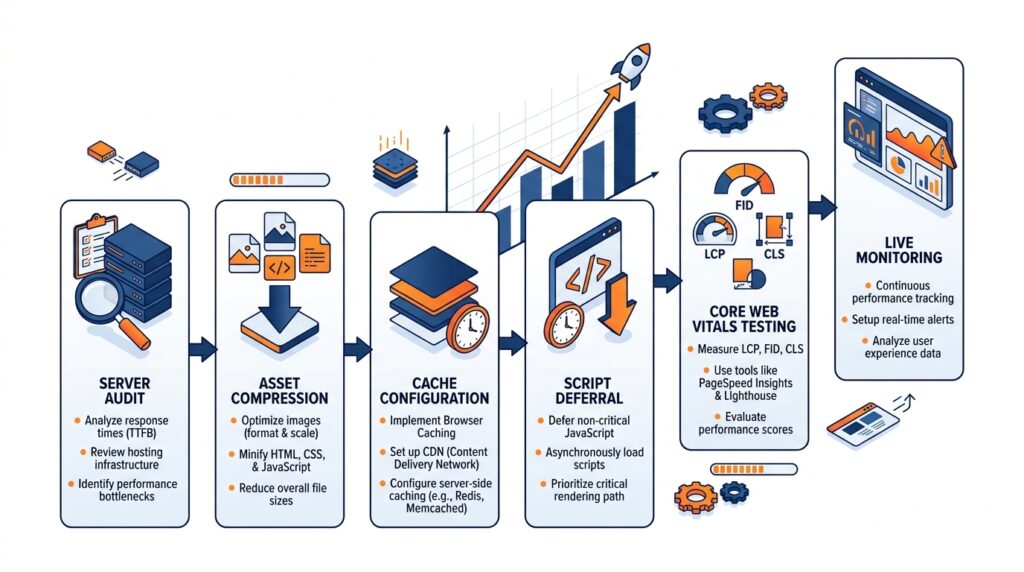
What is the Complete Step-by-Step Technical SEO Site Speed Checklist?
Direct Answer: The complete technical SEO site speed checklist follows an eight-stage sequence covering server audit, caching configuration, media compression, CSS and JavaScript deferral, Core Web Vitals tuning, mobile testing, bot access verification, and automated regression monitoring.
Below is the exact technical SEO site speed checklist our technical engineering teams deploy across enterprise B2B and e-commerce platforms:
- Benchmark Baseline Field Data: Pull 28-day Chrome User Experience Report (CrUX) field data from Google Search Console rather than relying exclusively on simulated lab tests.
- Audit Server Response and TTFB: Evaluate origin hosting hardware, database query latency, and PHP memory allocations. Target a global server response time below 800 milliseconds.
- Deploy Full-Page Server Caching: Configure Redis object caching or Memcached at the server level, combined with edge page rules via Cloudflare or Fastly.
- Implement Next-Gen Image Compression: Convert all JPEG and PNG assets to WebP or AVIF formats. Add explicit
widthandheightattributes to all images to prevent layout shifts. - Eliminate Render-Blocking CSS: Extract critical above-the-fold CSS for inline delivery in the document head and defer non-critical style sheets using asynchronous link rel attributes.
- Restructure JavaScript Execution: Defer non-essential scripts until DOM interactive, load tracking scripts via Google Tag Manager using custom consent triggers, and split large monolithic bundles.
- Configure Gzip or Brotli Compression: Enable Brotli compression on your web server or CDN layer to reduce transmitted text payloads by up to 20 percent compared to standard Gzip.
- Establish Continuous Performance Monitoring: Set up automated performance budgets and monitoring alerts using WebPageTest API or Lighthouse CI to detect speed regressions before code deployments hit production.
What Are the Core Web Vitals Benchmarks on the Technical SEO Site Speed Checklist?
Direct Answer: The Core Web Vitals benchmarks require achieving an LCP under 2.5 seconds, an INP under 200 milliseconds, and a CLS under 0.1 for at least 75 percent of page visits across mobile and desktop devices.
According to the official web.dev guide on Largest Contentful Paint, LCP measures perceived loading speed and marks the point in the page load timeline when the primary content has loaded.
Each Core Web Vital represents a distinct performance hurdle:
1. Largest Contentful Paint (LCP) Fixes
LCP is usually caused by slow server response times, render-blocking JavaScript and CSS, slow resource load times, and client-side rendering frameworks.
Key checklist remediations:
- Preload your priority hero image using
<link rel="preload" as="image" href="..." fetchpriority="high">. - Ensure that hero banner images do not use the
loading="lazy"attribute. - Establish preconnect links to external asset domains such as
<link rel="preconnect" href="https://fonts.gstatic.com" crossorigin>.
2. Interaction to Next Paint (INP) Fixes
INP replaced First Input Delay (FID) as an official Core Web Vital in March 2024, assessing overall page responsiveness across the entire visitor lifecycle rather than just initial input.
Key checklist remediations:
- Break up long JavaScript execution tasks exceeding 50 milliseconds using
setTimeoutorrequestIdleCallback. - Yield main thread control periodically during heavy computations to ensure touch and click inputs register immediately.
- Minimize large DOM tree depths to reduce layout recalculation times during dynamic updates.
3. Cumulative Layout Shift (CLS) Fixes
CLS measures visual stability by recording layout shift scores whenever visible elements change position from one rendered frame to the next.
Key checklist remediations:
- Reserve CSS aspect ratio boxes for all dynamic media, banners, and embedded advertisements.
- Use
font-display: swappaired with matching fallback font metrics to prevent flash of invisible text (FOIT). - Never insert dynamic promotional banners above existing content unless triggered by direct user interaction.
What Are the Pros and Cons of Executing a Technical SEO Site Speed Checklist?
Direct Answer: The primary benefits are increased organic search rankings, expanded Googlebot crawl capacity, lower bounce rates, and improved AI citation retrieval; the main limitations are engineering resource demands and ongoing maintenance requirements.
Pros
- Measurable search ranking uplift: Core Web Vitals are confirmed Google ranking factors that deliver direct organic visibility benefits.
- Higher crawl capacity: Faster server responses allow Googlebot to crawl more URLs per session, accelerating new content discovery.
- Substantially higher conversions: Fast-loading pages convert visitors at higher rates across lead generation forms and checkout funnels.
- AI search citation eligibility: High-speed static delivery ensures AI crawlers can fetch and parse content before execution timeouts expire.
- Reduced hosting bandwidth expenses: Minified code, modern image compression, and aggressive CDN caching lower origin server strain.
Cons
- Cross-team coordination overhead: Implementing code splitting and cache invalidation requires coordination between SEO, engineering, and devops teams.
- Third-party script conflicts: Sales and marketing teams often push back against deferring tracking tags, chat tools, and analytics pixels.
- Regression risks: New software deployments and marketing updates can quickly reintroduce performance bottlenecks without automated CI/CD guardrails.
What Are the Most Common Site Speed Mistakes Enterprise Teams Make?
Direct Answer: The most frequent site speed mistakes are loading marketing scripts synchronously, lazy-loading hero images, relying exclusively on synthetic lab tests, and failing to set aspect ratios on dynamic elements.
- Loading marketing tags synchronously in the head: Placing HubSpot, Hotjar, Facebook Pixel, and Google Tag Manager directly in the document head delays first paint by hundreds of milliseconds. Always load external analytics scripts asynchronously or with defer attributes.
- Applying lazy loading to above-the-fold hero images: Adding
loading="lazy"to your main product hero image prevents browsers from fetching it immediately, causing direct LCP failures. Only lazy-load assets situated below the initial screen fold. - Relying solely on lab diagnostics: PageSpeed Insights lab data reflects synthetic conditions. Google’s ranking algorithm evaluates real field data collected over 28-day rolling periods via the Chrome User Experience Report.
- Missing width and height attributes on media: Leaving image tags without dimension parameters forces browsers to recalculate page layout post-download, triggering immediate CLS penalties.
- Failing to configure browser cache expiration: Omitting explicit
Cache-Control: max-age=31536000headers on static assets forces returning visitors to download unchanged CSS and JS files on every visit. - Neglecting mobile performance: Many enterprise teams test performance on high-speed desktop connections, forgetting that Google evaluates sites through mobile-first indexing over simulated 4G mobile networks.
- Allowing uncompressed legacy file formats: Serving multi-megabyte PNG screenshots and unminified JavaScript bundles significantly inflates page weight.
How Do You Ensure AI Crawlers Can Access Your Speed-Optimized Pages?
Direct Answer: AI search crawler access requires explicitly permitting search retrieval bots in robots.txt and validating that CDN edge rules do not block their user agents, ensuring that fast pages remain eligible for AI Overviews and ChatGPT Search.
According to official platform documentation from major generative engines, AI search engines evaluate live indexed content using dedicated retrieval bots that operate under tight execution timeouts.
The table below outlines the necessary crawler governance rules for modern web platforms:
| Crawler User-Agent | Organization | Operational Role | Governance Recommendation |
|---|---|---|---|
| OAI-SearchBot | OpenAI | Live search indexation for ChatGPT Search | Allow (Required for ChatGPT search results) |
| PerplexityBot | Perplexity | Real-time web indexation and source verification | Allow (Required for Perplexity citations) |
| Claude-SearchBot | Anthropic | Real-time search discovery for Claude | Allow (Required for Claude search visibility) |
| Googlebot | Organic search and Google AI Overviews retrieval | Allow (Mandatory for all Google visibility) | |
| GPTBot | OpenAI | Offline foundation model training scraping | Discretionary (Does not affect search citations) |
| ClaudeBot | Anthropic | Offline foundation model training scraping | Discretionary (Does not affect search citations) |
Evidence Tier: Tier 1 – High Confidence (Official OpenAI, Google, Anthropic, and Perplexity documentation)
In addition to robots.txt rules, verify that web application firewalls (such as Cloudflare or AWS WAF) do not inadvertently challenge verified search bots with JavaScript captcha walls, which prevents content extraction.
How Does Off-Page Brand Authority Amplify Your Site Speed Investments?
Direct Answer: Off-page brand authority amplifies site speed investments because AI retrieval engines and search algorithms combine technical accessibility with multi-channel entity consensus to choose cited sources.
A fast, technically flawless page provides the foundation, but search engines prioritize brands that demonstrate broad external authority across verified digital channels.
According to the Ahrefs 75,000-brand AI Overview study, branded web mentions correlate at r = 0.664 with AI Overview citation frequency, and YouTube video mentions correlate at r = 0.740, whereas raw backlink counts correlate at only r = 0.218.
Evidence Tier: Tier 2 – Strong Observational Correlation. While correlation does not establish absolute causation, earning brand mentions across diverse platforms aligns strongly with generative citation frequency.
To amplify your technical performance gains, deploy your off-page presence across these core channels:
- Authoritative Industry Publications: Secure guest features and expert commentary on major vertical publications to reinforce entity co-occurrence.
- YouTube Video Breakdowns: Publish technical tutorials and site performance teardowns, as AI search models index video transcripts directly.
- Technical Communities: Participate meaningfully in Reddit (r/webdev, r/SEO) and Stack Overflow discussions where search engines regularly source solutions.
- Review Aggregators: Maintain complete profiles on verified review platforms like G2, Clutch, and Trustpilot to validate organizational credibility.
Case Study: How an Enterprise Portal Cut LCP by 68% and Gained 42% More Organic Traffic
Direct Answer: An enterprise B2B platform reduced mobile LCP from 5.4 seconds to 1.7 seconds, resolved all Core Web Vitals errors, and increased organic search impressions by 42% within 90 days of implementing this technical SEO site speed checklist.
The client, an international logistics and supply chain software vendor managing over 120,000 indexable URLs, saw organic visibility decline following consecutive Google algorithm updates.
Our performance engineering team conducted a full technical audit and implemented the checklist across four critical phases:
- Phase 1 (Origin and Server Caching): Deployed Redis object caching and upgraded origin hosting instances, reducing baseline TTFB from 1,450 milliseconds to 280 milliseconds.
- Phase 2 (Asset Compression and Preloading): Converted 18,000 PNG and JPEG product images to AVIF format, set explicit image height and width dimensions, and preloaded priority hero banners.
- Phase 3 (Script De-bloat): Deferred 14 third-party tracking scripts and consolidated tag execution through Google Tag Manager with post-interaction triggers, slashing main-thread blocking time by 3.2 seconds.
- Phase 4 (CDN Edge Rules): Implemented global Cloudflare Enterprise edge caching rules, ensuring static assets and cached HTML were served within 35 milliseconds of global visitors.
90-Day Remediation Outcomes:
- Mobile LCP: Improved from 5.4s to 1.7s (Well within Google’s “Good” threshold).
- Mobile INP: Reduced from 340ms to 85ms.
- Cumulative Layout Shift: Reduced from 0.24 to 0.02.
- Organic Search Impressions: Increased by 42% across core commercial keyword clusters.
- Crawl Efficiency: Googlebot crawled 3.1x more pages per day, clearing a six-month indexation backlog.
How Do You Measure the Long-Term Success of a Site Speed Programme?
Direct Answer: Long-term site speed success is measured by monitoring Google Search Console Core Web Vitals field data, tracking Googlebot crawl stats in server logs, and isolating AI search referral traffic in Google Analytics 4.
Measuring success requires looking beyond one-off PageSpeed Insights scores to evaluate real-user field trends and bot crawl activity.
Set up your measurement framework across these three core reporting channels:
- Google Search Console Field Reports: Monitor the percentage of URLs meeting the “Good” threshold across mobile and desktop. Aim for at least 90 percent of your indexable catalog in the green zone.
- Server Log Crawl Analysis: Track daily Googlebot request volumes and average response download times in your server access logs. An increase in daily crawled URLs confirms that crawl efficiency has improved.
- GA4 AI-Referral Tracking: Configure a custom channel grouping in Google Analytics 4 titled “AI Search” using the source regex
chatgpt\.com|perplexity\.ai|gemini\.google\.com|copilot\.microsoft\.com|claude\.aito monitor visitors arriving directly from AI citations.
By reviewing these three data streams monthly, engineering leaders can verify that performance optimizations continue to protect organic revenue.
Key Takeaways
- Field data governs search rankings: Google relies on real-user Chrome User Experience Report field data, not synthetic lab scores, to determine search ranking impacts.
- Server TTFB controls crawl volume: Keeping origin response times under 800 milliseconds directly expands Googlebot’s daily crawl rate limit on large enterprise domains.
- LCP demands preloading and early fetches: Preload hero banners using
fetchpriority="high"and never add lazy loading attributes to assets situated above the fold. - INP measures whole-session responsiveness: Break up long JavaScript tasks exceeding 50 milliseconds to keep user input response times under 200 milliseconds.
- Explicit dimensions eliminate layout shifts: Always specify width, height, and CSS aspect ratios on images and video embeds to keep CLS below 0.1.
- AI search eligibility requires crawlable speed: Permit
OAI-SearchBot,PerplexityBot, andGooglebotin robots.txt and ensure HTML responses render within two seconds. - Continuous performance monitoring prevents regressions: Integrate automated Lighthouse CI checks into code deployment pipelines to catch performance leaks before production release.
Frequently Asked Questions
What is a technical SEO site speed checklist?
A technical SEO site speed checklist is an end-to-end operational guide that audits and optimizes server infrastructure, Core Web Vitals metrics, asset delivery, and JavaScript execution to maximize search engine rankings and user retention. It provides webmasters with prioritized, measurable steps to eliminate render delays and maintain high crawl efficiency.
How does website speed affect Google search rankings?
Website speed affects Google search rankings through Google’s page experience algorithms, which directly evaluate Largest Contentful Paint, Interaction to Next Paint, and Cumulative Layout Shift as confirmed ranking signals. Additionally, faster server response times enable Googlebot to discover, crawl, and index newly published URLs at a significantly higher daily frequency.
What tools should I use to audit my technical SEO site speed checklist?
The best tools for auditing your site speed checklist are Google Search Console’s Core Web Vitals report for real-world field metrics, PageSpeed Insights for template-level diagnostic audits, WebPageTest for in-depth waterfall analysis, and Screaming Frog for detecting sitewide asset payload and status code bottlenecks. Combining field data with diagnostic lab tools delivers the clearest path to performance remediation.
For engineering teams managing complex headless CMS setups, Shopify Plus, or enterprise WordPress environments, manual script optimization can consume weeks of developer sprints. If your internal team lacks bandwidth to diagnose deep database query latency or render-blocking third-party scripts, partnering with specialized B2B site speed optimization services guarantees sub-1.2s Core Web Vitals under enterprise SLAs.
140-character summary: Execute this technical SEO site speed checklist to resolve Core Web Vitals, accelerate server response, and secure page-one rankings in 2026.a
